setting goals

Published by Paul Kinlan on:
A lot of Web Development has changed almost overnight and I didn’t quite realise it was happening. When I started to write this post in August, there is a lot of discussion about loops, graphs, goals and autoresearch, with the general gist that you give your LLM and agent harness an objective or some endstate and your tools will keep iterating until the goals have been achieved.
While I’ve been putting it to the test on a couple of projects, what I didn’t see coming was what happens when anyone can think of a goal and point it at some software. Clones, Remakes, Demakes, and reverse engineering have, to my mind, changed the web, and that cemented its value (until the Agent Harnesses become the host) - people can just whiff out a phrase and get a working product. Two examples of that: REA wires an agent into Ghidra, Hopper or IDA so it can inspect an app without its source, from native binaries down to websites; ArtCraft is seven open source Rust apps built with Claude against Adobe’s tools, running on the desktop and in the browser.
I found that goals can be as simple as: “Make it faster” and the Harnesses and the models are good enough to, well, make it faster.
Agree. Claude was able to do this better than I could since Opus 4.8 or so. 5.5 models are now very good at it.
All you do is give the model
- a goal (eg. “Make p95 ci time <10 mins”)
- a way to measure its result (eg. “Read timings in bigquery after each change”)
- a sense of how hard to try (eg. “Don’t stop till it’s done, it might take a few weeks of experimenting”)
This pretty much works for most things. I often also ask the model to show me a chart with progress to goal every day, or to dm me a live artifact with the result
— Boris Cherny (@bcherny) October 10, 2026
I put this to the test recently on a number of different projects and it’s been pretty incredible. I’ve changed how I engage with my tools and I found that I circled around two different types of goals:
- High-level goals - What is the overall shape of the project? How should it work?
- Continuous goals - What are the things that we always need to keep on top of?
- Real-user performance, users-errors, unexpected CSP violations, security etc.
- Data source updates (i.e if your project reflects some other project and you need to be in sync)
Now it’s not as clear cut as those two groupings, because you find that as your project develops, high-level goals become smaller increments of functionality and start to look like continuous goals.
But with all this in mind, here are some of the learnings from the projects that I’ve been working on for the last couple of months that have been following this pattern.
Project 1: Chrome Platform Showcase
The first project that I tried this on was a problem that we have on our team. Chrome updates every 4 weeks and there can be 30-40 changes to Chrome’s view on the web-platform in every release. When Chrome moves to its 2 week release cycle you would expect that that number might halve, but I expect everyone’s favourite paradox (the Jevons one) will come into play and we will eventually end up with the same number of changes every two weeks. For a Developer Relations team, the current state is already unsustainable. It’s nearly impossible to create the requisite examples and samples for every feature in every release… So can I help the team?
The chrome-platform-showcase is my experiment to create a complete directory of compelling samples, demos and tools for every feature that comes into Chrome’s web-facing feature set (it works quite well, but not perfectly enough to be fully launched.)
Chromestatus.com is our view on what we know about Chrome and it contains links to as much information as we have about the state of the feature. So, if we have the links to the Spec (or the draft of it) that describes how it should work; the explainer which contains a more human-readable explanation and use-cases; links to the actual implementation in Chrome, as well as the change requests, bugs and feedback from the other browsers on the platform. We have a pretty good picture of how the feature works and what it was intended to be used for, we can then prompt our favourite LLM and agent-harness to build what we think a developer (or their agent) might need and want to use.
Initial Goal:
Scan https://chromestatus.com/ and use all the links
inside the entry (e.g, Explainer, Spec or existing
demos) to determine how the feature works, what it is
supposed to be used for and to understand the API
semantics. Create simple examples or utilities (such as
API tester or configurators) that showcase just the API.
Findings: While it mostly worked to start, I had to set out very clear goals and how to test each of the demos and I had to direct it to not create a “simulation” of the API it was trying to create a demo for.
The testing loop was also pretty critical because the models have no built-in knowledge for these brand-new capabilities, it was important that we ask the harness to test the demo as much as possible. For example, Load the demo, Check visually, check the console for error logs, interact with the demo, repeat.
There were some issues with this project, sometimes the data in Chrome Status is wrong, which leads to an increase in the likelihood we won’t build an accurate demo, or worse we build a demo for a feature that is not actually in the browser yet.
In other cases the API interacts with some browser UI that Chrome DevTools Protocol just can’t seemingly interact with.
Because this project updates every week and is unattended, this is the first project where I needed to start to add observability into the project. Any console log or browser error should be added to a database that subsequent runs can analyse and see if it can use it to fix the demo.
Project 2: WASM vs JS Performance Benchmark
I had a conversation with a friend in Chrome about WASM and that it outperforms JS quite frequently. The conversation turned to the use of LLMs and Agents and we asked the question: If people are starting to never look at the code the tools produce, why not just have them output straight to WASM? It was a fun conversation and it opens up a lot of other questions about one of the pillars of openness on the web, but we didn’t even have a benchmark or any tests to validate our hypothesis that WASM is faster than JS. wasm-vs-js is my experiment to try and get to an answer. I had a hunch that given a comprehensive set of benchmarks that the tools would be able to get me the answer.
Initial Goal:
Create a benchmark that compares the performance of
common algorithms, web apps like Todo MVC (to test the
DOM performance) and web development tasks running JS vs
WASM. I will give you a list of benchmarks that I want to
see but please feel free to suggest more [inserted a list
of benchmarks]
Findings: This was one of the most frustrating builds that I have done. I tried to use a lot of what I learnt from Chrome-platform-showcase to set a goal that would let the agent run for a long time building out the entire framework, but it ran into many issues (because I wasn’t specific enough) and I spent a huge amount of time trying to course correct.
- It created different benchmarks and tests that made no sense and I had to spend a long time working on them
- It didn’t create working web apps, it created simulations of web apps.
- I realised that I wasn’t specific enough with my prompt: “JS vs WASM”. I had thought that it might take an algorithm, write in C then compile it WASM. Nope. The LLMs just generated RAW WAT (Web Assembly Text) files. That raises a question for another post (why bother with JS if we aren’t looking at it anyway)
- The project got architected in a way that made it very hard to change and add multi-lang support in (C, Rust, Dart etc)
Failures aside, this was a very interesting experiment because I don’t think we could have dedicated people’s time to it and it did show me some of the rough edges of the models and harnesses.
I ran out of credits many times and had to move to less capable models. Secondly, my local machine was running incredibly hot and my changes were taking an incredibly long time to complete.
It took about 120 seconds to run the validation/testing phase of the build. I looked at this as a critical component because I was letting the tool just work with minimal supervision and I needed a way to “ensure” that the LLM correctly implemented what I had asked, but it took far too long to complete and it was incredibly frustrating.
I got to use the pi-autoresearch extension in a couple of different scenarios. Firstly, /autoresearch make the build faster was enough for the tools to go through about 50 iterations and take the build from 120 seconds to about 12.
Secondly, area that I used autoresearch on was to help me answer a common complaint of performance benchmarks when comparing languages. Frequently when trying to create these types of benchmarks in the past is that idiomatic code is not always the fast code. Well, it turns out /autoresearch for every test create an optimized version. Keep the original so we can compare performance of original vs optimized in a benchmark run works rather well. While the tools chew through tokens, it was incredible to watch the iteration towards more optimal versions with reasoning about what worked and what didn’t.
Project 3: Web AI Showcase
webai.show is a site that pulls together over 230 different AI models from Hugging Face and creates between 3 and 4 use case based examples.
I have this hypothesis that many web developers, well, many people, struggle to see where AI models can be used for something useful for them. I’ve seen this happen for “Web AI”, where we have a lot of the core technology but it’s incredibly hard to look at the portfolio of all the models on huggingface and know where you might want to use them for day-to-day tasks. So I decided to follow the example I had from the chrome-platform-showcase example and task my LLM and Agent to iterate through each web-runnable model on huggingface and create a set of demos for each that highlight use cases for how they could be used in a more real-world scenario, and if possible create a demo combining multiple models.
Initial Goal:
Create a website that showcases how to use every model
on hugging face. I want to at least 3-4 demos for each
model that follow:

"Basic" - how to use the model at it's most basic level.

"Practical" - Where it might be used in a product.

"Wild" - Get creative and do something people might not
expect.

Multi-model: How to use this model with other models on
hugging face so people can think about AI-powered
systems.
Findings: This project was probably the smoothest of the set of demos as I didn’t have to correct how I set up the goals or change constraints as new ideas came in to my head. It just chugged along for a while and burned up all my subscription quota many times.
What I did find is that the models, well, aren’t that creative in the use cases so “Wild” and “multi-model” right now aren’t that compelling. Don’t get me wrong, some of the demos are actually pretty cool, but for any given model can they do something cool that will inspire people? I’m less sure.
It’s been good to see this project just keep chugging along with the same high-level goal that now runs once every couple of weeks to keep the site updated and I feel confident that given my token budget it can continue to run indefinitely.
Project 4: State of the Web using web-uplift
I wanted to see how the web is progressing in terms of some objective qualities (Performance, Memory Usage and other UX criteria), so I built state of the web which uses webuplift to analyse the top 1000 sites (but it could be any set of sites that you care about)
Like in “the prompt is the program”, this entire suite is run by giving your Agent a simple goal to run what is in the AGENTS.md.
Initial Goal:
Use Web-uplift to analyse the top 1000 sites and tell me
the quality of how the sites are built. Make it so that
it runs through the agent harness so that I can use the
tokens in my subscription.
Findings: It actually worked pretty well. It surprised me that you can set this high-level goal and many of the models were able to stay on track. I did find though that sometimes the model and harness would think that it had scanned everything, but it stopped after 700. A lot of my time on this was refining how we did the tests and how I wanted to present the content.
I stopped running this for a number of reasons:
- scanning thousands of sites and running them through an LLM was supremely expensive before DeepSeek-flash, now it’s only very expensive,
- the top sites either don’t want headless browsers running on them, or they are, let’s say… “for a mature audience”.
Project 5: An Agent Platform in the Browser
Following on from my “The Browser is the Sandbox” post and co-do.xyz and the follow on “Building a Claw in the browser” extension for Chrome that would let you control Chrome with an LLM, I wanted to explore a new agent-platform in Chrome. CAP is a much more familiar looking harness that you use as your command centre for “knowledge work”. You can use it to complete tasks, watch and listen to actions in the browser (e.g, watch for new bookmarks and auto categorise them) and you can even have named agents (like in my Business in box - this was way before GrokBot, just saying).
Initial Goal:
Create an extension that treats the new tab page as a
command-centre in the browser. The user should be able to
start tasks and have a conversation with the browser. The
tasks should have access to every single extensions API.
Use the same double-iframe technique as in co-do to
generate assets and UI that the user might ask for in a
task. Use the same hooks idea to respond to browser
events as in ChaOS (https://github.com/paulkinlan/chaos).
Findings: The very first generation of this was quite good, but I put it down to having a lot of my previous projects as context my pi could use. I spent a lot of time experimenting with what my tools created and then a lot of time refining the product to something that I now use in Chrome daily. I then added in new processes that refine the product and aim to then improve the quality of it (e.g, performance) every day.
Where I did struggle with this project is that there were so many commits going into this project (I had lots of agents running in parallel), that there were always merge issues that I would need to spend a huge amount of tokens on to resolve and the test suite would take up to 30 minutes to run for even the simplest set of changes.
I think about Chrome as an OSS project a lot. There are many hundreds of people from around the world working on this and committing and testing and it all works kind of seamlessly, likely because of the way it’s been architected over the years. I’m not confident that LLMs (or us as prompters) know how to architect software in a way that could let hundreds of agents contribute to the project every day.
Project 6: Audio-feed
When I saw the Gemini 3.8 TTS launch I knew that I had to build an RSS feed or web page to Podcast tool. As part of my health kick over the last two years I do an hour or two walk every day with the dog and while walking I can’t read the web, but I can now listen with Audiofeed.
Initial Goal:
Create a website that lets me add in an RSS feed or a
blog post to transcribe using Gemini 3.8 TTS
(https://docs.cloud.google.com/gemini-enterprise-agent-platform/models/gemini/3-8-flash-tts)
add the transcribed content to a Podcast RSS.
Findings: It worked mostly. What I realised in this project is that I didn’t specify if this was a multi-user system or not, so it just built a simple tool that let’s me copy and paste a URL in (well, it would let anyone add content to my RSS feed). I also found that I need deep observability in my projects so that I could monitor and fix issues as the website was being used. I really needed to understand the performance (e.g CWV), the errors, the crashes on the client and also on the server and get them in to a database. The Reporting Observer API gives you insights into the issues that users experience inside the client and it gives you information that you didn’t know you needed.
Now I have systems in place that let me see what’s happening with my users and fix or optimize the sites. Btw, Web API feature request. We need some way to authenticate that it is in fact the browser sending the Report-uri headers.
Project 7: Fleet Management
Once I got into giving my tools tasks, I went to the place where I think many people go. “Well, I’m building so much now that the only thing to do is build my own fleet of agents that manage all my goals and invent a new SDLC”.
Fleet (sorry, not linking to it yet) is a set of scripts that started as a goal to manage a fleet of agents on exe.dev using Beads as my task management platform and it continues to iterate on all of the projects mentioned in this post.
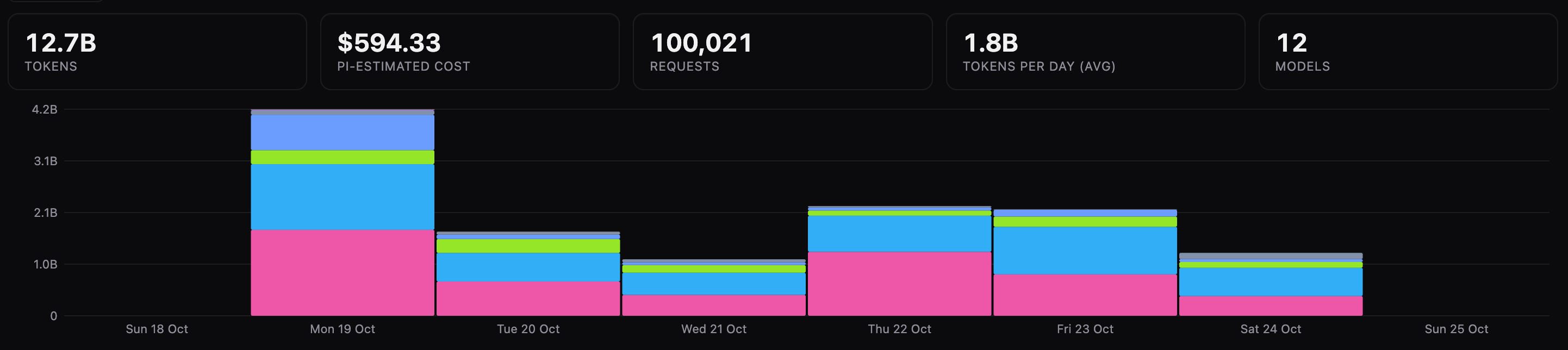
Project management
It’s gone very well, allowing me to manage 30 projects just through my phone following the high-level goal setting, however I have seen that the models and the harness, unless strictly prompted, will find lots of work to burn tokens on (i.e, finding lots of edge-cases that it fixes at the source instead of taking a wider and more holistic approach).
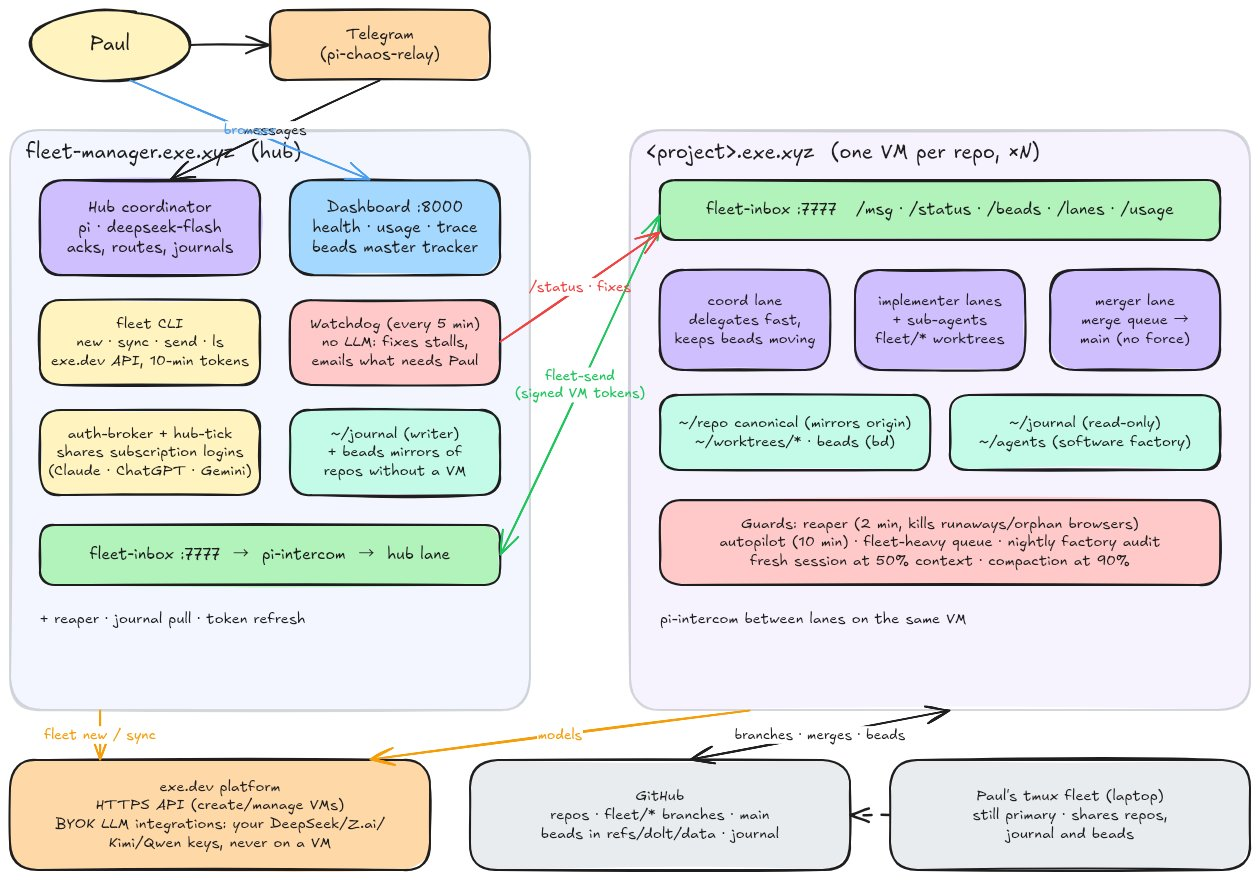
The Fleet manager
I’m pleased with these projects and my experiments in goal setting for long-horizon tasks and I’m convinced that, yes, Software Engineering has changed over night, and while this might not be the final shape, being clear on the goals (vs just the tasks) will be our number one priority as an industry because the people coming to the web now and building for it are already ahead of us.
While my experiments have not been perfect, it has been incredibly insightful. Especially seeing how all the different models can interplay with each other and more importantly, how having a strong hand that can continue steering models is critical.
For my own mistakes, I found that my high-level goals were simply not comprehensive enough and this impacted my work in three ways:
- while the first versions of all this work were pretty good, I really wish I’d used a Grill-me style skill to help me co-design the intended functionality of the sites more.
- Long running tasks suffered from something I think we should call “task-attenuation” (or “goal-attenuation”) because leaving a harness to iterate over tasks and subsequently create further tasks (say via code reviews) can lead the models to rat hole and nit pick to keep busy vs being more expansive. I think this is something I will write up in a follow-up post.
- I found that there is more and more common infrastructure that the models don’t include by default to build what I believe are high-quality sites (i.e, the security principles like CSP, performance thresholding and monitoring or system observability). I’ve created a prompt. This should let you kick start a new project (like the one I am using to write this very post) and have it include lots of different best practices as clear project goals to continue to monitor. However we will have to think about the actual physical $ cost of long running or regular tasks - unless token costs come down, this will be an impact that many of us aren’t quite ready for
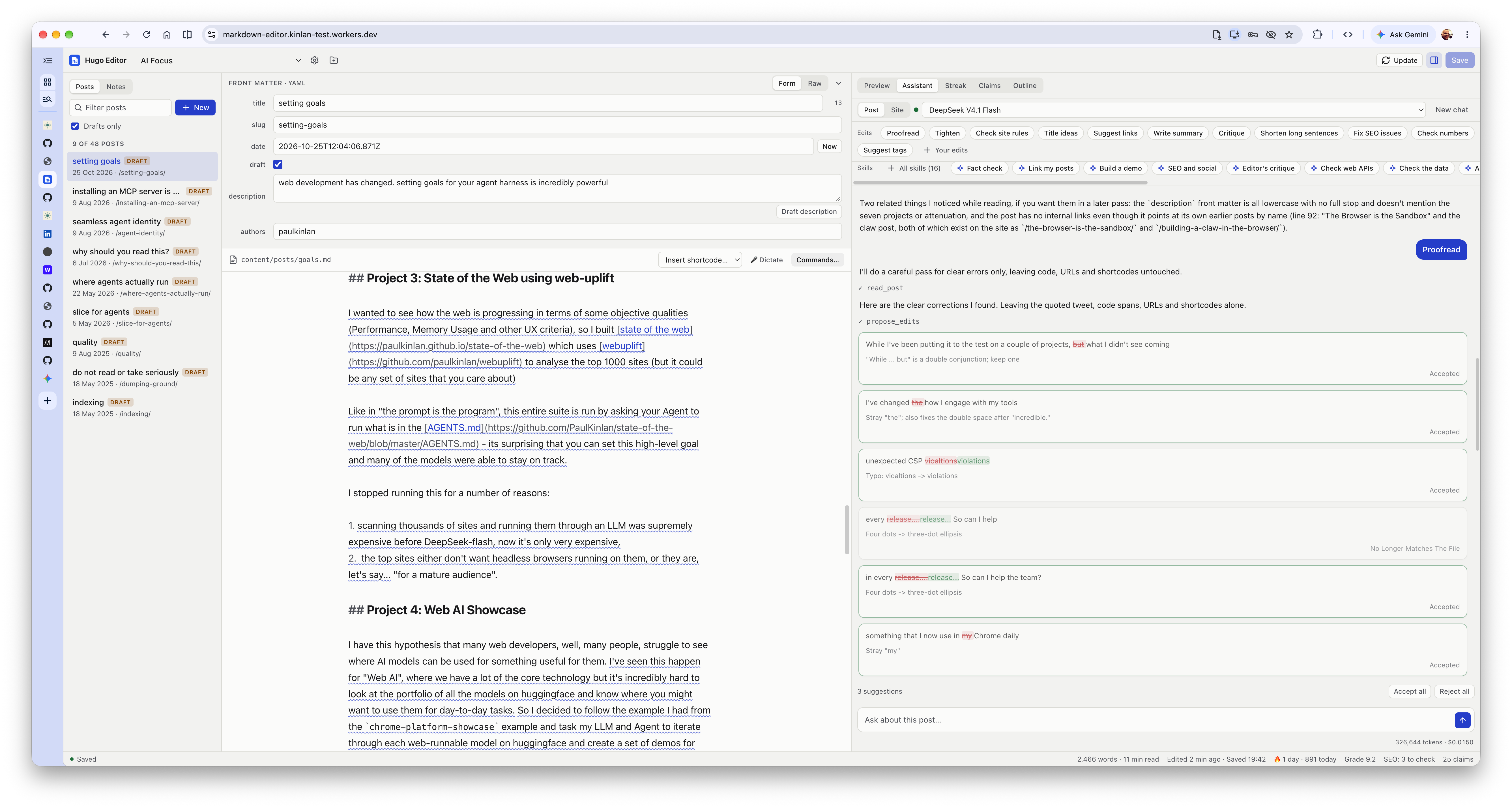
The editor that I built to make this post, because why write when I can build a tool before writing
If we consider this in context to the REA, ArtCraft and many other remakes and clones there is still a lot of opportunity to massively increase the quality of experiences that people use, and I still think even just asking “make my site faster” is a good start.
Long-live software!
Comments