# building a claw in the browser
_By Paul Kinlan — 22 May 2026_
What is described here in this project is dangerous, it can get pretty much full access to everything inside your browser and could enable control of your browser from outside it
I really do believe we are witnessing a transition in how we build and run software. This entire blog is dedicated to my explorations in this space, for example, I wrote about why [the browser is the sandbox](/the-browser-is-the-sandbox/) which explains how we can use the web platform's battle-tested security boundaries to execute untrusted code. But sandboxing is only half the battle, when what remains is the utility of any of this technology.
A lot of the people in the web industry that I've followed over the years are either actively against the changes in technology or are not yet aligned with it and see no value, or consider it actively harmful.
Outside of the considerable utility that I get with coding-tools, [OpenClaw](https://openclaw.ai/) was the first project where I could really get a handle on how computing really will change and that model has become 2nd nature to me now. If you are not familiar with it, you can give your LLM of choice access to your system by connecting them directly to messaging platforms, filesystems, and execution environments to perform real-world tasks on your behalf. It can then act as a local autonomous agent with unrestricted native filesystem and network privileges, which while incredibly risky has been a platform-changing moment.
It got me thinking: **Could we build a Claw-like system entirely inside the browser?**
Yes we can, and I did. This post will deep dive into the system I've built.
I'm calling it [**Chaos**](https://github.com/paulkinlan/chaos) (Chrome Agent Operating System... yes, I did think of the name first). Chaos is, well, Chaotic. It is a demonstration of a multi-agent browser-based environment packaged as a Chrome Extension (Manifest V3) that coordinates a relay server to act as a complete, sandboxed agent runtime.
Seriously, this is a demo. It's not a product. It's not official. It's dangerous. You will be burnt if you play with this!!
For a quick overview of what this project does without having to risk an install, you can watch:
[YouTube video](https://www.youtube.com/watch?v=I6TRH2A3mv0)
What follows is a deep dive into the actual architecture, capabilities, and mechanics under the hood of Chaos, and why the browser might just be the ultimate operating system for AI.
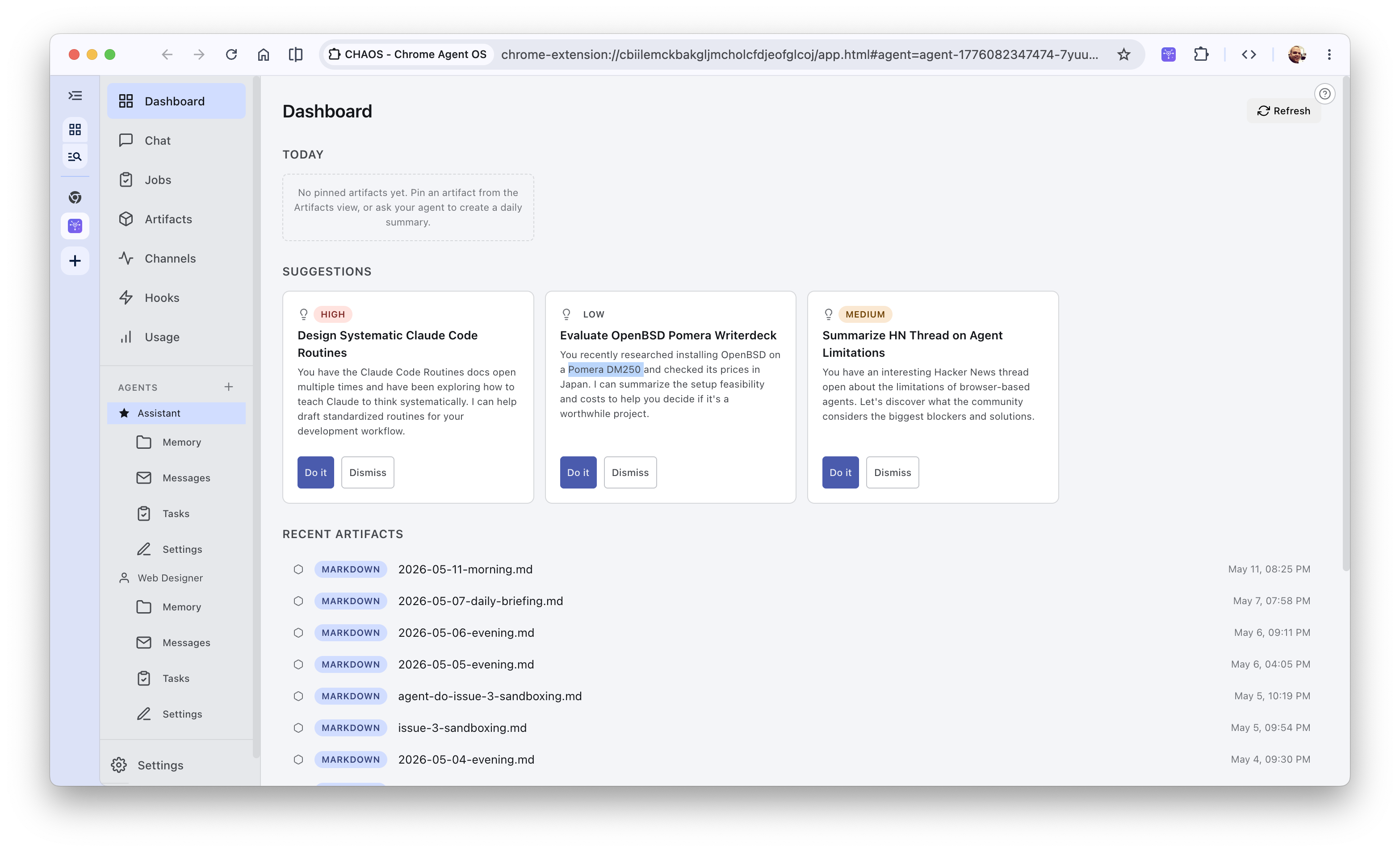
_Chaos Dashboard showing suggested prompts and recent artifacts_
## The Chaos Architecture
At its heart, Chaos is packaged as a Chrome Extension. I’ve written before about how [Chrome extensions are the closest thing we have to a declarative agent packaging format](/shipping-a-prompt/). They declare their permissions upfront in a manifest, their lifecycle is event-driven, and they run inside V8 isolation.
To achieve this cleanly, Chaos is built as a **decoupled monorepo** using npm workspaces. Modularity is exceptionally high, splitting codebase concerns into separate, cohesive packages:
* [`packages/extension`](https://github.com/paulkinlan/chaos/tree/main/packages/extension): The Chrome extension host client (background script, OPFS integration, app UI).
* [`packages/agent-loop`](https://github.com/paulkinlan/chaos/tree/main/packages/agent-loop): A provider-agnostic autonomous execution loop wrapping [agent-do](/agent-do-my-agent-loop/.
* [`packages/sdk`](https://github.com/paulkinlan/chaos/tree/main/packages/sdk): A shared TypeScript library containing an API surface for the Hooks and Channels that are a layer above the agent-loop, type definitions, and protocol schemas.
* [`packages/tui`](https://github.com/paulkinlan/chaos/tree/main/packages/tui): A terminal-based React Ink dashboard to show the concept working without the extension.
* [`packages/server`](https://github.com/paulkinlan/chaos/tree/main/packages/server): Deno Deploy relay server.
Chaos structures this environment to act like a mini-OS, split between a Chrome extension frontend and a Deno Deploy relay server:
```
+------------------------------------------------------------------+
| Chrome Extension (Manifest V3) |
| |
| +------------------+ +-------------------+ |
| | app.html (UI) | | background.ts | |
| | - Agent columns |<-->| (Service Worker) | |
| | - Task board | | - Message routing | |
| | - File explorer | | - Hook listeners | |
| +------------------+ +--------+----------+ |
| | | |
| v v |
| +------------------+ +-------------------+ |
| | IndexedDB | | OPFS | |
| | - Conversations | | - agents/{id}/ | |
| | - Page cache | | CLAUDE.md | |
| | - Vector cache | | memories/ | |
| | - WASM binaries | | - shared/ | |
| +------------------+ +-------------------+ |
+------------------------------------------------------------------+
| WebSocket + HTTP polling
v
+------------------------------------------------------------------+
| Relay Server (Deno Deploy + Deno KV) |
| - REST API / WebSocket pairing |
| - Webhook channels & Telegram Bot bridge |
+------------------------------------------------------------------+
```
### 1. The Master Agent & Sub-Agent
Chaos does not rely on a single agent. Instead, it implements a hierarchical master-worker system.
* **The Master Agent**: The first agent initialized on installation is the Master. It has exclusive access to system-management tools (like `create_agent`, `assign_task`, `find_agent`, and `delete_agent`) to coordinate sub-agents.
* **Role Templates**: There are specialized role templates (master, researcher, coder, writer, planner, reviewer, and general-purpose neutral). Each role is provisioned with a distinct persona loaded directly from templates into the agent's isolated directory.
* **Self-Evolving**: I modelled [self-modification from my journal idea](/prompt-is-the-program/) so that agents are empowered to edit their own `CLAUDE.md` instructions in their OPFS directories as they interact with you, adapting their behavior and learning your preferences over time.
### 2. TweetDeck-Style Multi-Column Chat
I flippin love TweetDeck style interface. A long time ago [I worked on the prototype of TweetDeck for the web](https://youtu.be/DKaJ6jEPXGE?t=366) to demonstrate at a Google IO, and even longer ago I built a tool called [FriendDeck](https://paul.kinlan.me/launching-frienddeck/) that was TweetDeck but for Friendfeed (heh, a blast from the past). Most AI chats lock you into a single column. But Chaos adopts a **TweetDeck-style multi-column layout** where you can pin side-by-side conversation columns. You can have a column for your Master agent, another for an active background Research job, and a third representing a developer agent writing code, letting you oversee the entire "chaos" of your agent pool in real-time.
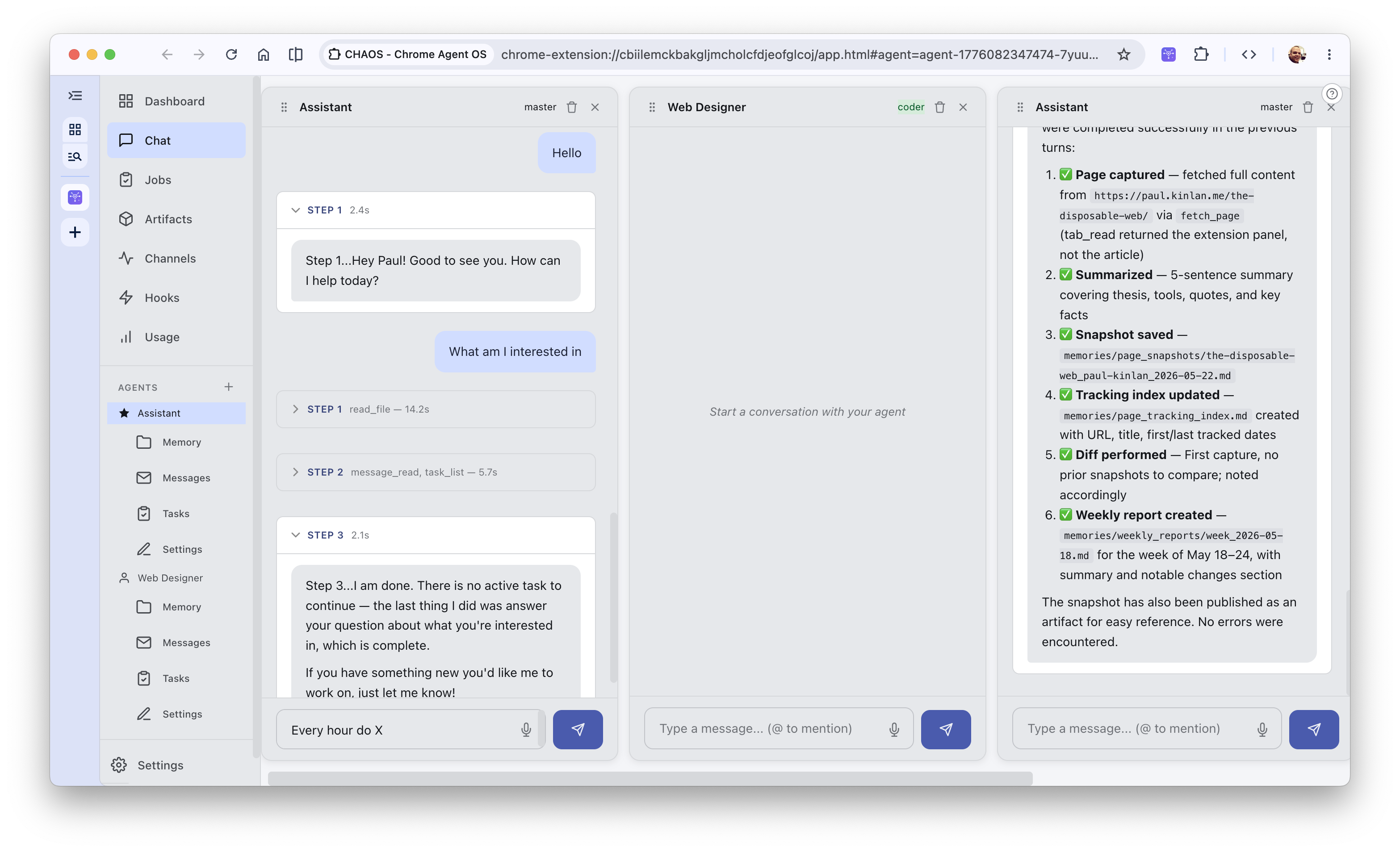
_A TweetDeck style UI but Claws_
And because Chaos is structurally modular, this side-by-side experience isn't confined to Chrome. [`packages/tui`](https://github.com/paulkinlan/chaos/tree/main/packages/tui) implements an **Ink-based interactive terminal TUI** right in your console! It compiles a highly polished, responsive dashboard leveraging React Ink, letting you manage your columns, execute code reviews, and track task checklists straight from your workspace command line.
### 3. Background Jobs & Shared Task Boards
AI loops shouldn't require you to sit and watch them stream. Chaos introduces a shared **Jobs and Tasks Board** where long-running or scheduled tasks are tracked. Since the agents operate asynchronously inside the Manifest V3 service worker (or offscreen document), they can check in on their assigned tasks, update their progress metrics, and log details to the global task pool.
You can inspect the entire queue unfiltered to see what the entire cluster of agents is up to, or filter the task list by a specific agent to drill down into their immediate assignments.
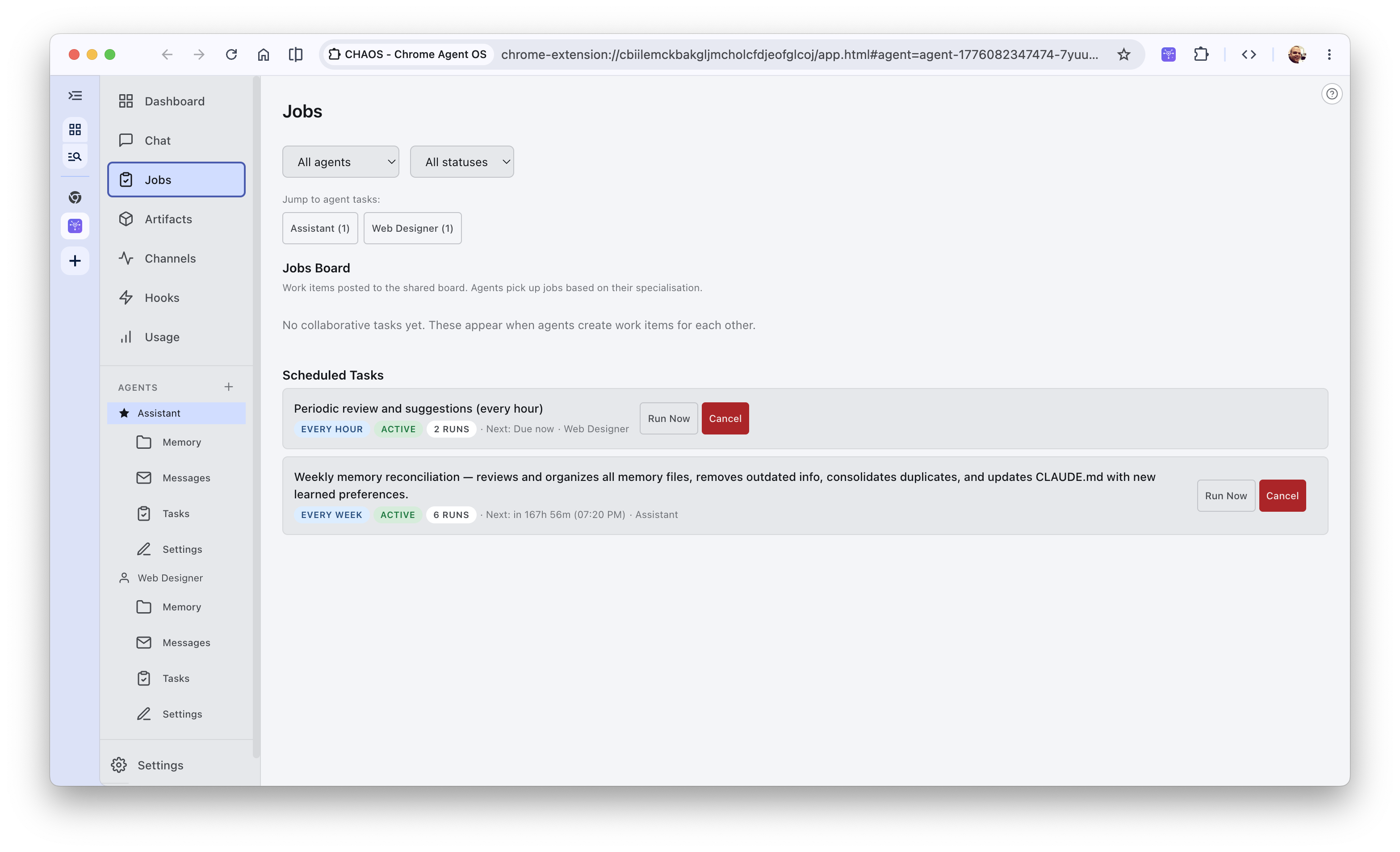
_Unfiltered background jobs and scheduled task boards across all active agents_
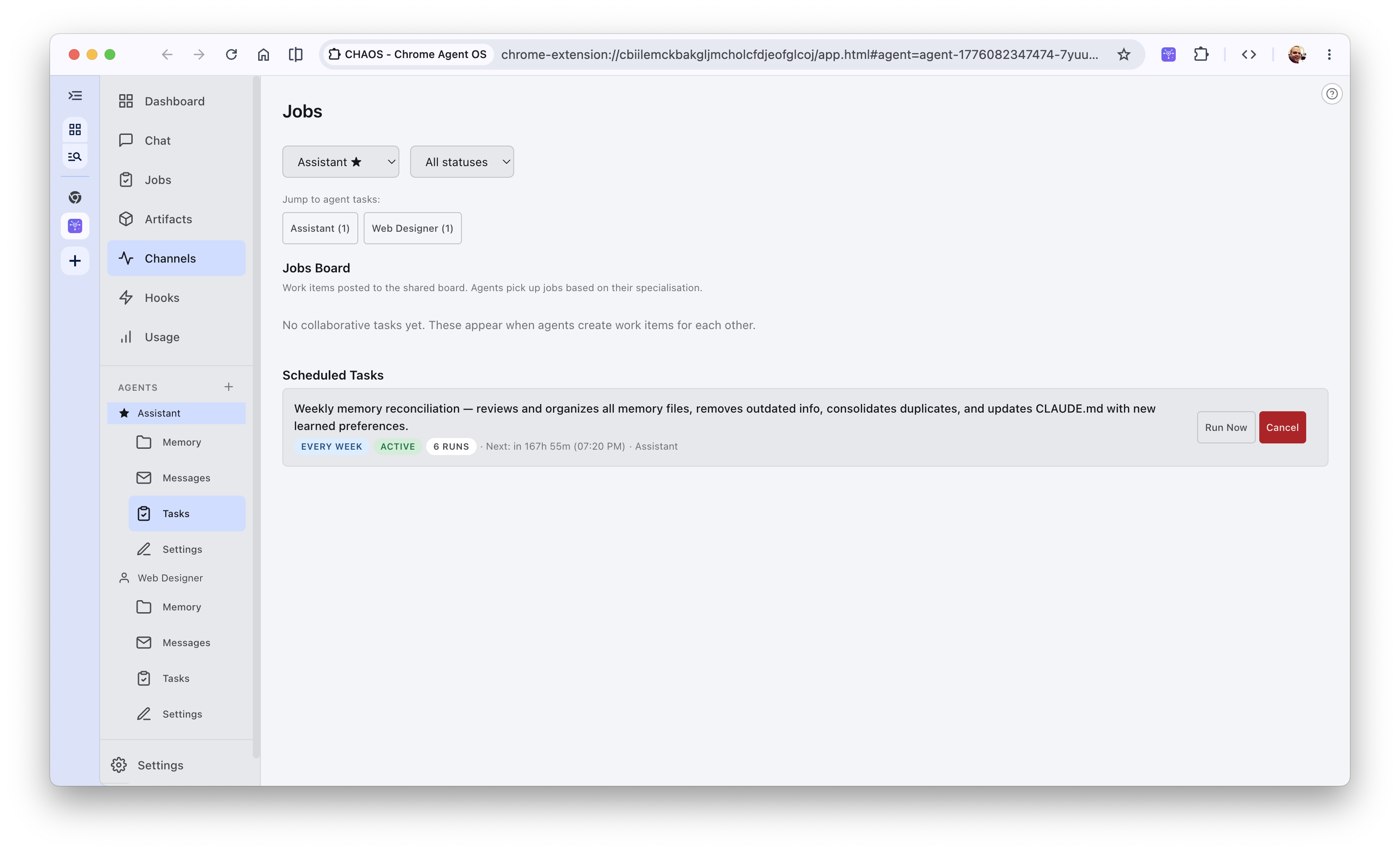
_Scheduled tasks filtered specifically for the active Assistant agent_
### 4. Local data and Shared Artifacts
Agents inherently keep as much data as local as possible by using the **Origin Private File System (OPFS)** which keeps everything as sandboxed as possible per agent. Each agent gets its own directory containing its `CLAUDE.md`, append-only `activity-log.jsonl`, a local `TODO.md` checklist, and topic-specific `memories/`. Files are shared via a central `shared/` bus which handles `messages.jsonl` (message bus), `tasks.jsonl` (task board), and `artifacts.jsonl` (published shared artifacts).
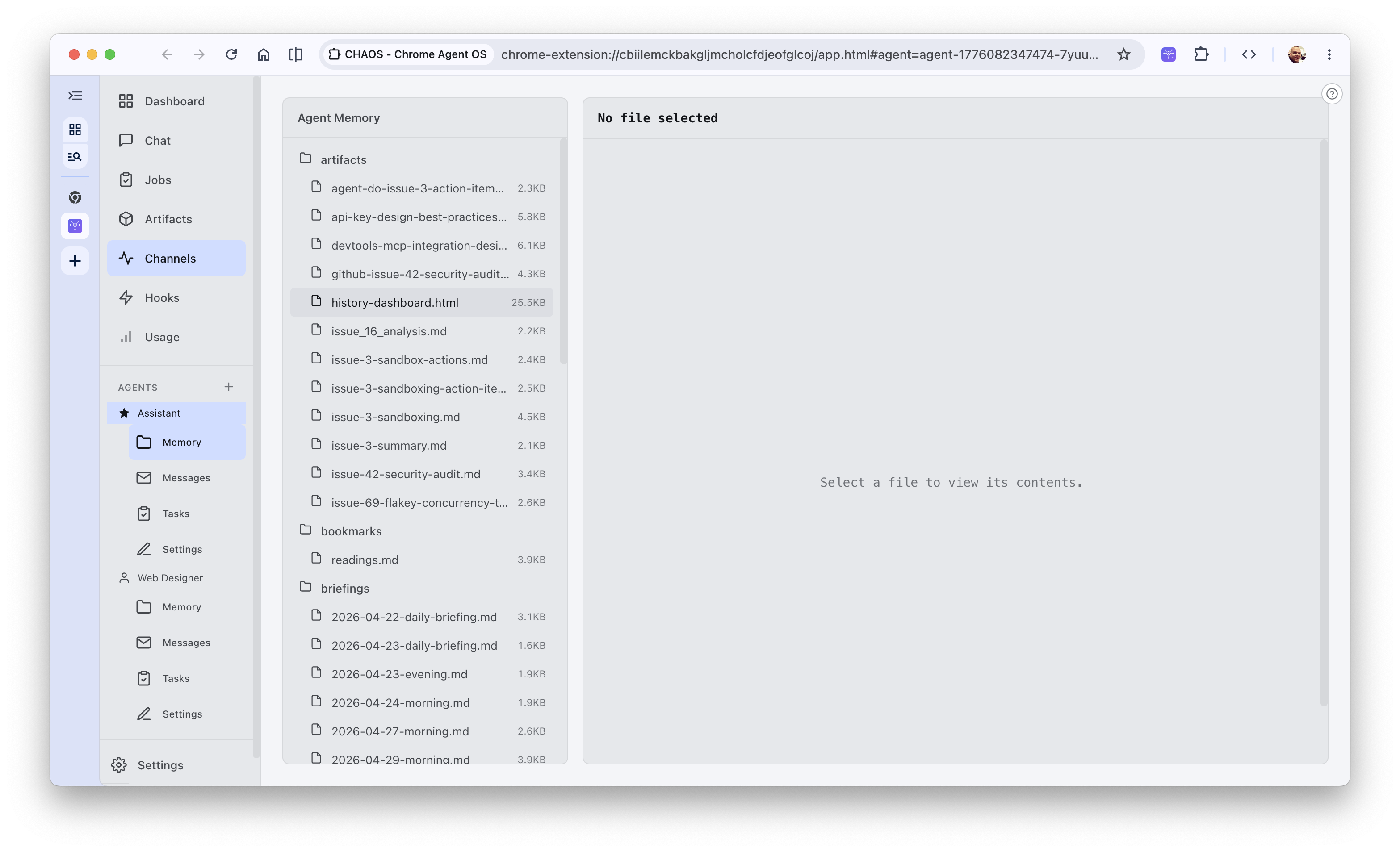
_Deep dive into the Agent's Memory structure using the Origin Private File System explorer_
However, there are a number of cases where either the user would want to quickly see their output or another agent would want to use the output in their own tasks, and this is where the shared artifact board comes in.
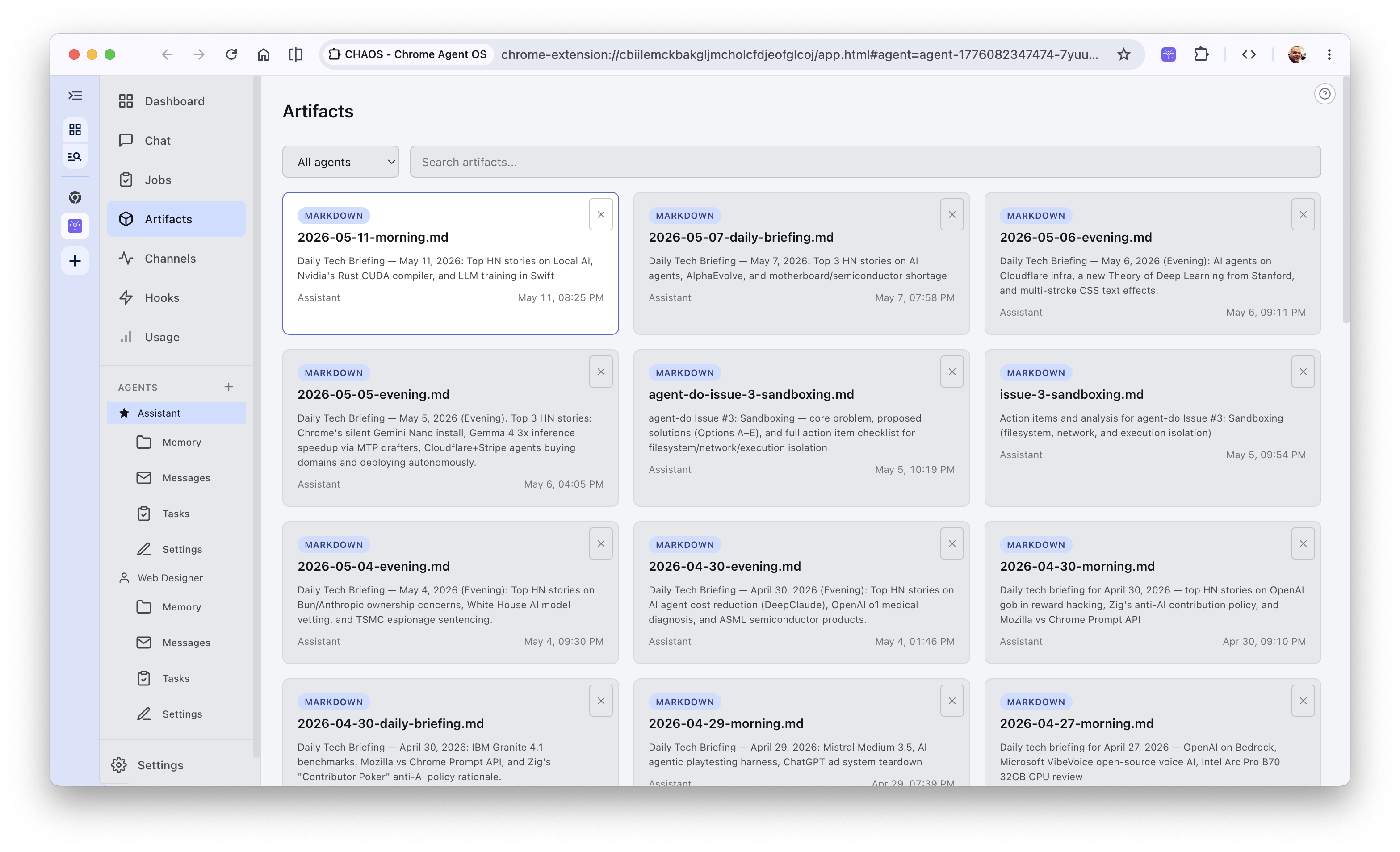
_Chaos Artifacts Directory showcasing published markdown documents generated by the agents_
### 5. Pluggable Agent Skills
To keep system prompts lean and modular, Chaos supports a **Pluggable Skills Engine**. Instead of overloading an agent's base system prompt with every possible set of domain-specific instructions, you can browse, install, and toggle specialized skills.
A skill (like *Frontend Design* or *Web Artifacts Builder*) is a package containing specialized markdown instructions (typically a `SKILL.md` file) that is dynamically injected into the agent's context when loaded. This allows you to rapidly adapt a neutral agent into a highly focused specialist with a single click.
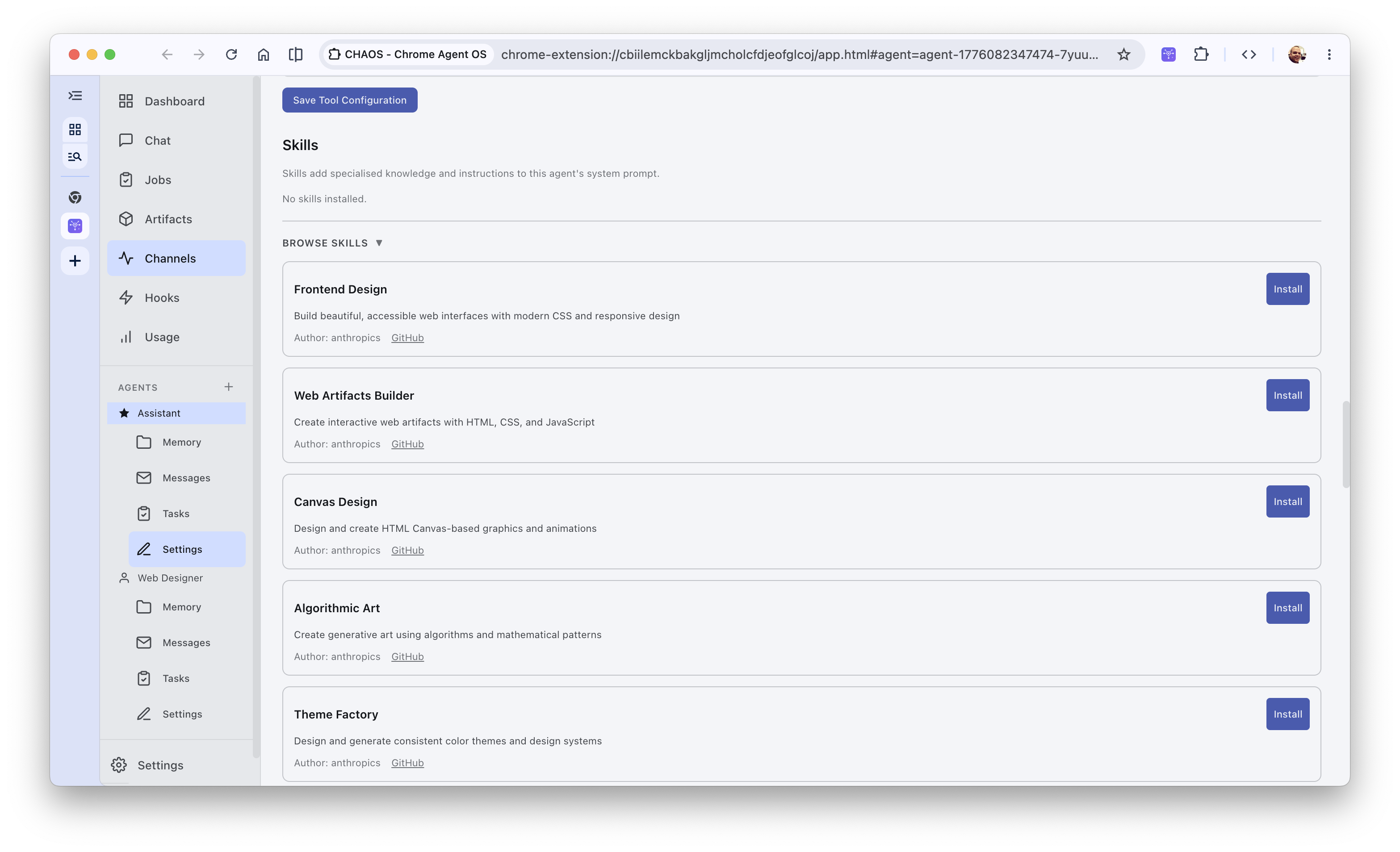
_Browsing the Chaos library to install specialized skills like Frontend Design or Web Artifacts Builder_
### 6. A Massive Tool Chest (69+ Built-In Tools)
To give agents "hands," Chaos implements a pluggable tool system assembled per-agent and whitelisted/blacklisted dynamically. These are divided into core families:
* **Chrome APIs (31 tools)**: Managing tabs, windows, cookies, and reading list entries.
* **File Operations (11 tools)**: Rich interaction with the sandboxed file store (`read_file`, `write_file`, `edit_file`, `grep_file`, `find_files`).
* **Communication (10 tools)**: Sending messages, managing channels, and syncing state.
* **Web & Search Grounding (2 tools)**: Extracting clean markdown using a content-script-based Readability+Turndown extractor (`tab_read` with three-tier fallback) or an offscreen document parser (`fetch_page`), combined with LLM provider-native search grounding (Google, Anthropic, or OpenAI search).
* **WASM Custom Tools (7 tools)**: Safe local processing for hashing, encoding, or text transformation.
Every single tool execution is wrapped in a permission-checking layer where the user can set tool-specific trust rules (always allow, ask each time, never allow) to prevent unauthorized file writes or network calls.
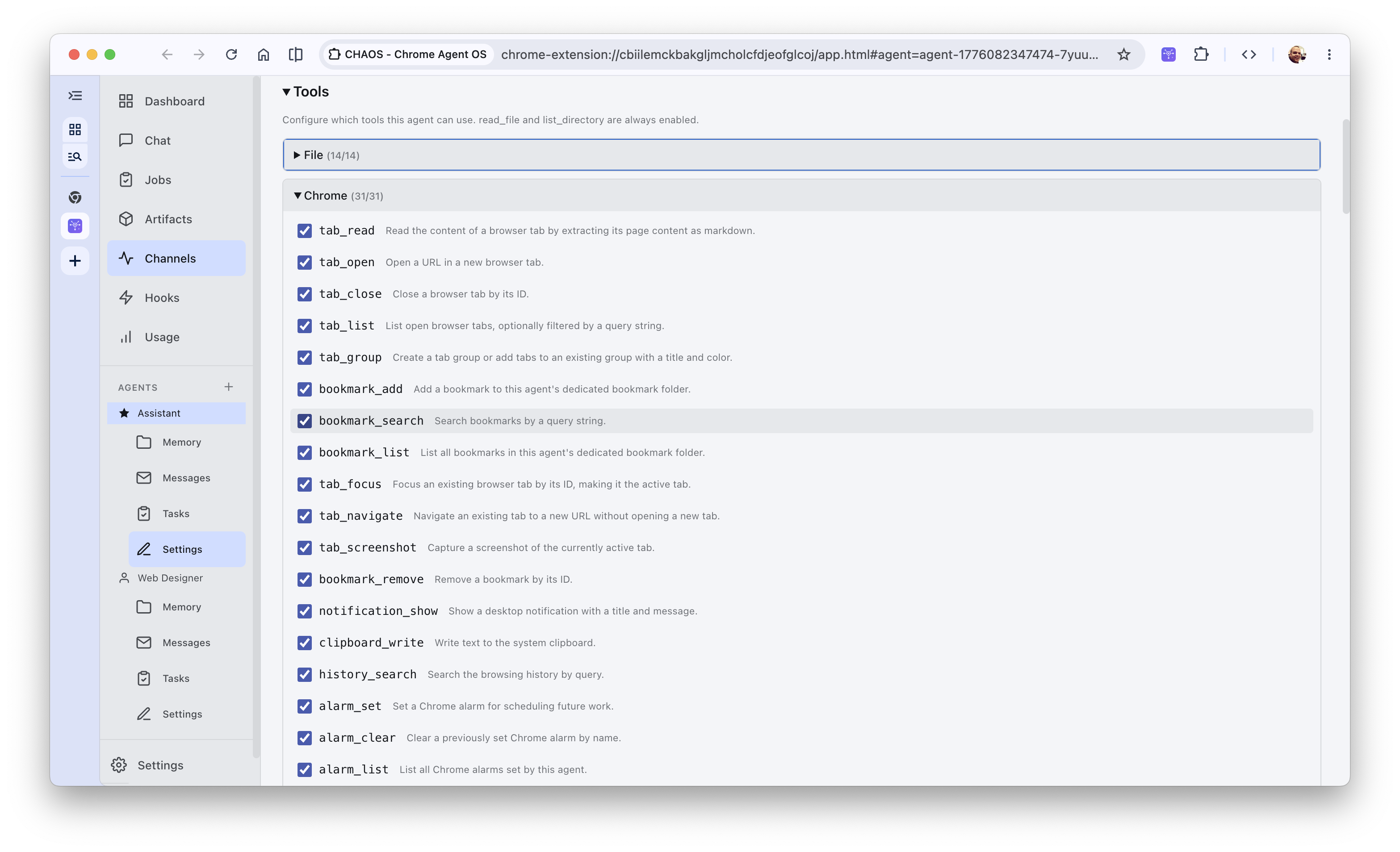
_Chrome Extension settings displaying granular permission controls for Chrome-specific API tools_
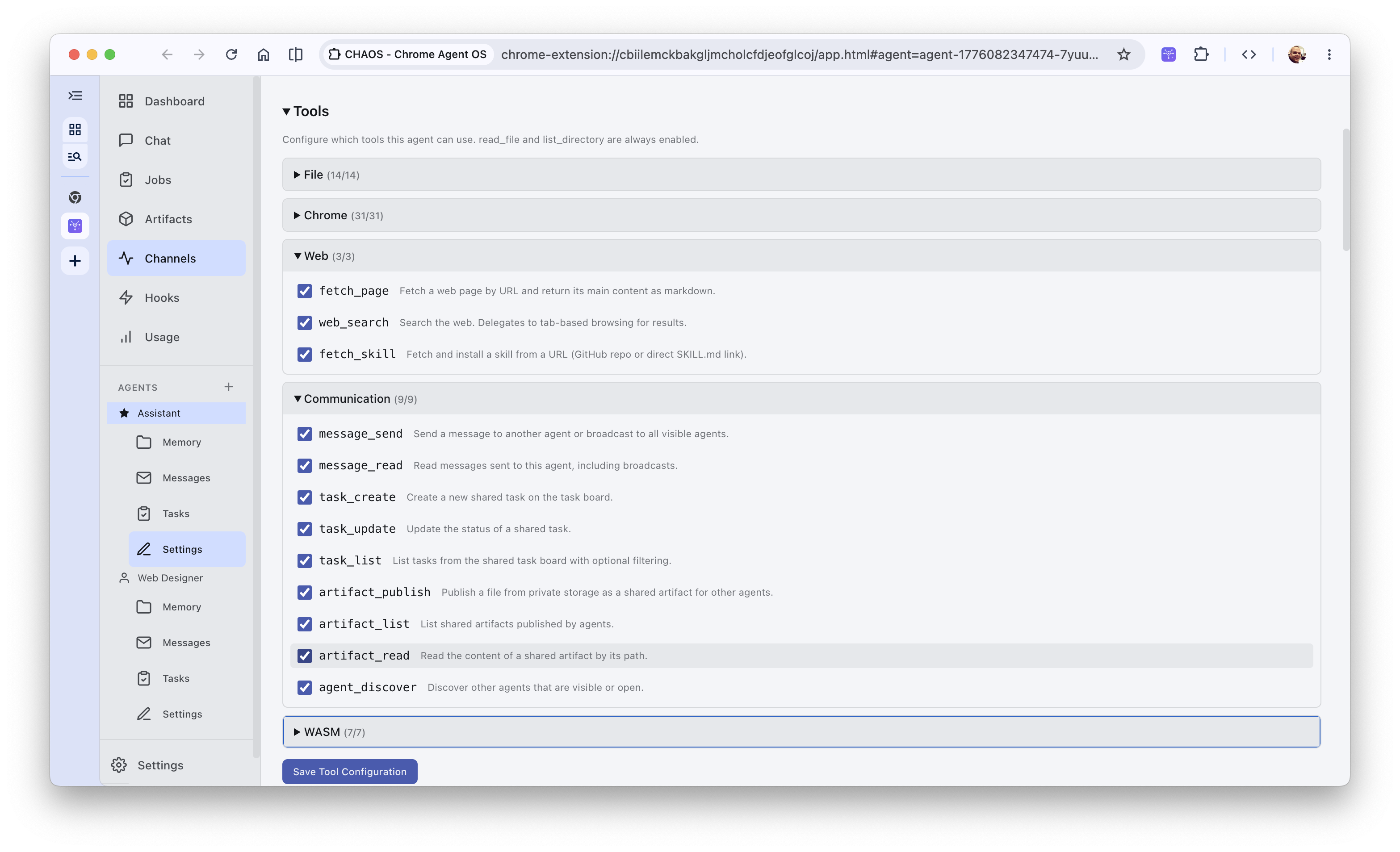
_Web, communication, and WebAssembly tools configuration in the agent profile manager_
## 7. Reactive State Hooks: Giving Agents Senses
True agents shouldn't just respond when prompted; they should react to their environment. Chaos implements **14 Hook Trigger Types** that hook directly into native Chrome events:
| Trigger | Event | Typical Use Case |
|---|---|---|
| `bookmark-created` | `chrome.bookmarks.onCreated` | Strip ads, extract text, index in memory. |
| `tab-navigated` | `chrome.tabs.onUpdated` | Trigger an audit or audit page performance. |
| `download-completed` | `chrome.downloads.onChanged` | Read file metadata, run code reviews. |
| `history-visited` | `chrome.history.onVisited` | Extract concepts to build user interest maps. |
| `idle-changed` | `chrome.idle.onStateChanged` | Perform heavy indexing when system is idle. |
| `omnibox` | `chrome.omnibox.onInputEntered` | Custom keyword execution in the URL bar. |
| `context-menu` | `chrome.contextMenus.onClicked` | Highlight text -> trigger deep research. |
When an event fires, the background service worker captures it, resolves the context, builds a prompt, and launches an autonomous `agentic-loop` in the background. If a bookmark hook fires, a background agent can extract the page content, summarize it, and save the digest as a shared artifact without interrupting your active tabs.
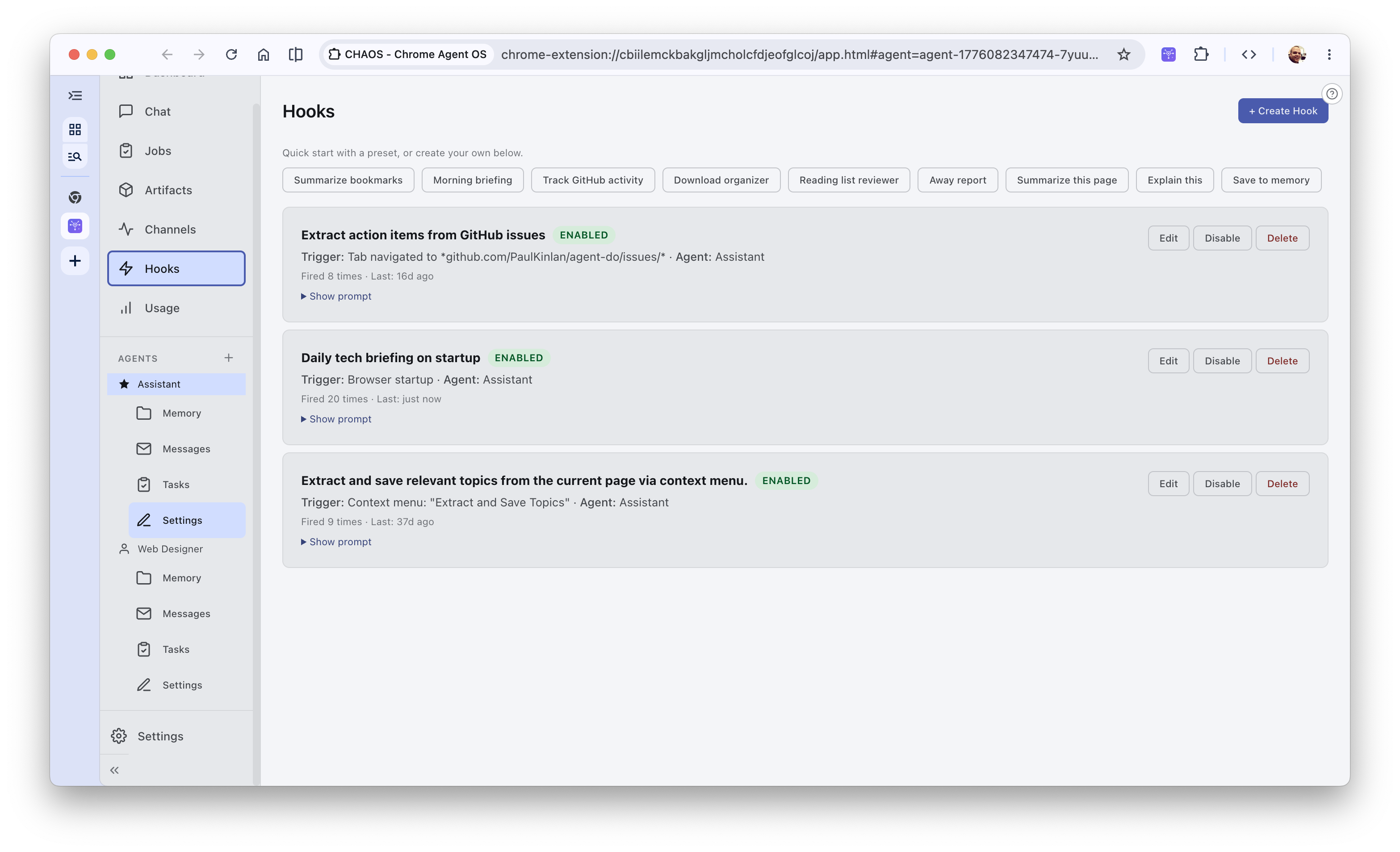
_Chaos Hooks Dashboard showcasing enabled event triggers and startup briefing automations_
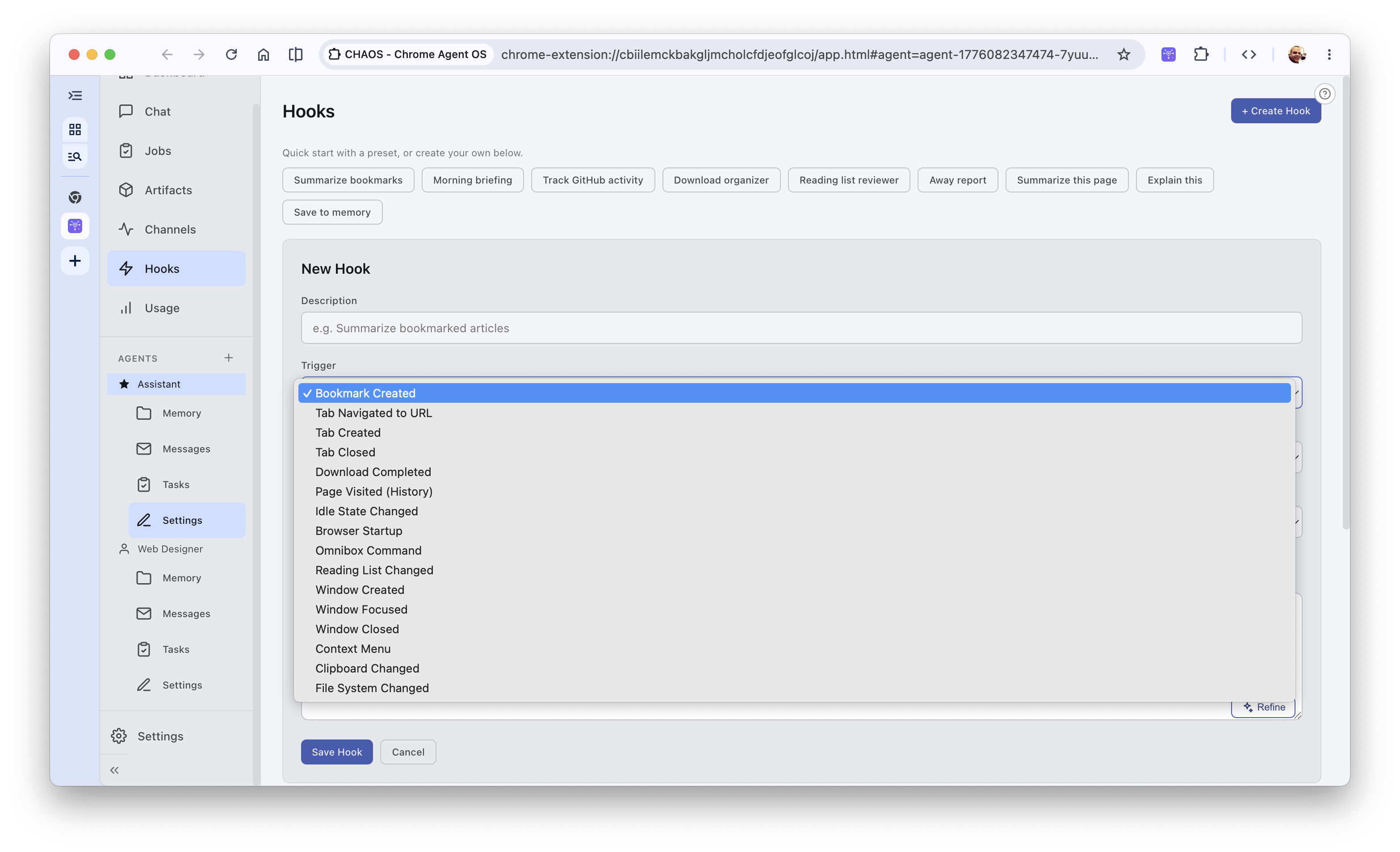
_Granular browser-level events available as triggers when creating a new reactive hook_
### Dynamic Hooks
Standard trigger events like standard bookmarks or page navigations are cool, but they only scratch the surface of what an in-browser agent framework can actually achieve when its tool chest and execution loops are natively linked. Because the agent loop has direct access to the extension's capabilities, the boundaries of how it senses and reacts to the browser become incredibly fluid.
Here are a few ways we can leverage this to make the agent feel truly integrated into your daily workflow:
#### 1. Creating Context Menus on the Fly
Usually, context menus in browser extensions are static—defined once on installation and left untouched. But in Chaos, the agent loop itself can dynamically call `chrome.contextMenus.create` or `chrome.contextMenus.update` based on its own state or active goals.
If an agent is running a deep research project on "advanced sandboxing", it can dynamically register a new context menu option: *"Send to Sandbox Research Folder"*. When you highlight text on any page and click that option, it fires a `context-menu` trigger that feeds that specific text straight back into the researcher agent's memory. Once the task is finished, the agent dynamically cleans up after itself and destroys the menu item. The agent essentially constructs its own UI senses on the fly to match its active work context.
#### 2. Temporal Hooks (`chrome.alarms` & Dynamic Timers)
Time itself can be a powerful reactive trigger. Instead of relying on a bloated backend cron system, Chaos can use the browser's built-in `chrome.alarms` API to schedule autonomous agent wakeups.
Because the agent can parse natural language, you can simply tell it: *"Check the status of my Deno deploy queue every 3 hours while I'm active."* The agent invokes a tool that registers a `chrome.alarms` trigger under the hood. When the alarm fires, the background service worker wakes up the agent, runs the check, and logs a status update to the shared task board. This turns a static prompt into a self-sustaining background cron job running locally in your browser.
#### 3. Hooks that Spawn Hooks
Because all the tools that configure and control the extension's internal state are exposed directly to the agent as standard tool definitions, **an agent can register its own hooks**. A hook can literally create a hook.
For example, if you ask the Master agent: *"Monitor my downloads, and if I download a PDF containing the word 'security', summarize it."*
1. The agent doesn't just run a one-off script. It registers a primary `download-completed` hook with a filter matching `.pdf` filenames.
2. When a matching file is downloaded, that primary hook triggers a sub-agent.
3. The sub-agent inspects the PDF. If the PDF does not contain the word 'security', it might register a *secondary* temporal hook to re-check the folder or alert you later. If it does contain it, it runs the summarization.
This recursive self-configuration lets the agent dynamically extend its own sensory network based on the tasks it encounters, forming a highly adaptive, self-evolving loop of triggers and responses.
## Channels that can break into the browser
**This is probably the MOST dangerous part of the project.** You can push data into Chaos from outside the browser. Because of this structure, a bad actor targeting the relay infrastructure mentioned below could potentially compromise your browser and local environment.
A major hurdle for any browser-based agent system is accessibility. Because a Chrome extension is hosted locally, it lacks a public IP address, cannot open public ports, and is completely isolated behind the browser’s networking stack. How does a script running on an external server (like a GitHub Action) or a chat message on your phone reach your browser agent to trigger a task?
To bridge this gap, Chaos integrates with a public-facing **Relay Server** (built in Deno and hosted on Deno Deploy) that acts as a secure intermediary.
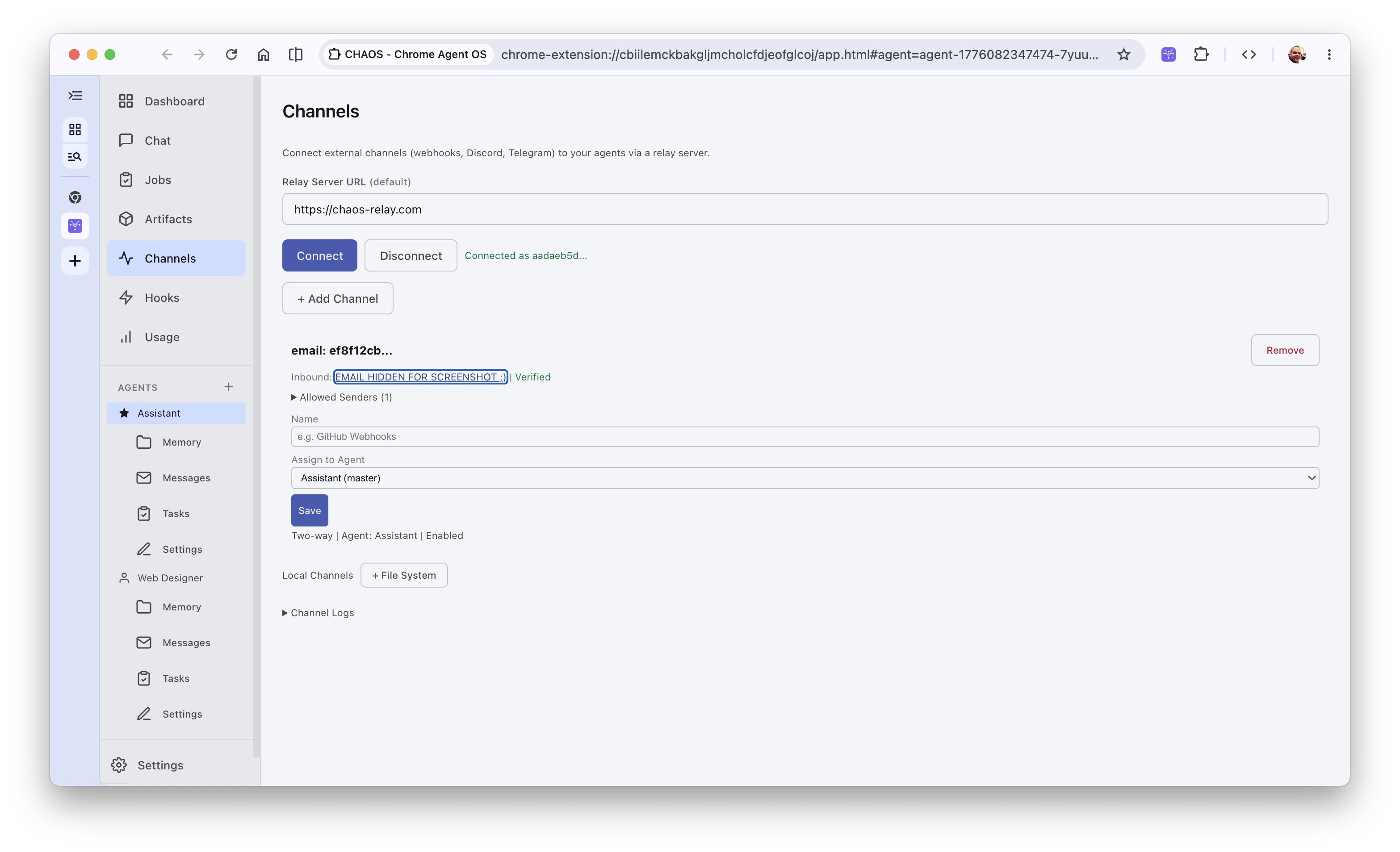
_Connecting external messaging channels and checking Deno Deploy WebSocket tunnel status_
```
+-----------------+ +-----------------------------------+ +------------------------------+
| External Source | | Relay Server (Deno Deploy) | | Chrome Extension |
| | | | | |
| Webhook POST | | POST /webhook/:id | | |
| -------------->|=========>| 1. Validate signature / secret | | |
| | | 2. Store in Deno KV | | |
| | | 3. Trigger kv.watch() | | |
| | | | | |
| | | WebSocket: /ws?token=... | | WebSocket Connection |
| | | ================================>|=========>| - Wakes up BG script |
| | | - Instant push message payload | | - Dispatches to agentic loop|
| | | | | |
| | | WS "reply" or POST /reply | | Agent runs loop (OPFS files)|
| Platform Send | | <================================|<=========| - Sends reply back to Relay |
| <--------------|==========| - Route to Bot API / Resend | | |
+-----------------+ +-----------------------------------+ +------------------------------+
```
### One-Way vs. Bidirectional communication
To maintain as tight a security boundary that I can muster, the Relay Server **only ever routes agent replies back through the exact channel that ingested the original trigger**. The extension dispatches a reply carrying the original `channelId` and `channelType`, which the relay uses to resolve the correct outbound path.
These channels fall into two classifications:
1. **One-Way (Inbound-Only) Channels**:
* *Example*: Generic HTTP `webhook`.
* *Flow*: An external service POSTs JSON data to `POST /webhook/{channelId}?token={secret}`. Because generic webhooks are one-way HTTP pushes, the Relay has no platform endpoint to push replies back to. Instead, when the agent completes its run, the relay stores the output in Deno KV. The external service must poll `GET /responses/{channelId}?since={timestamp}` to retrieve the agent's replies.
2. **Bidirectional Channels**:
* *Examples*: `telegram`, `discord`, `email`.
* *Flow*: The platform dispatches an event (Telegram update, Discord interaction, inbound email) which is stored and sent to the extension. When the agent replies, the relay intercepts it and **immediately dispatches the reply** back to the active chat context using that platform's native API.
### MCP and Tunneling
One of the most powerful architectural patterns in Chaos is its ability to turn the local browser into a host for external environments.
What if you want to use the browser-manipulation tools (like tab reading, list management, or sandboxed OPFS file lookups) inside your local IDE (like Cursor) or CLI tool (like Claude Code)? Chaos supports a secure **Double-Agent MCP (Model Context Protocol) Tunneling** bridge:
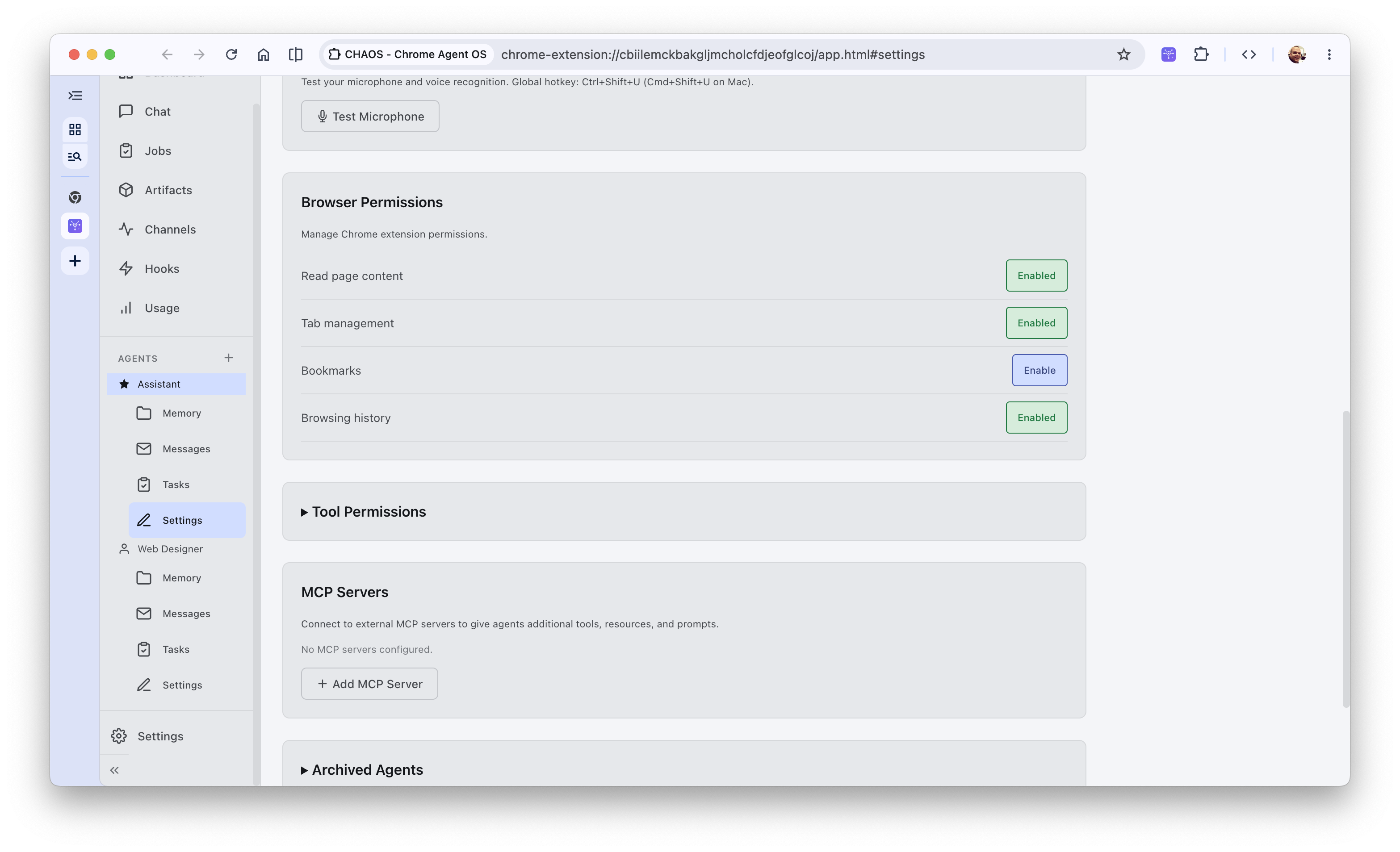
_Global Settings showing browser permissions, tool grants, and external Model Context Protocol server configuration_
1. **JSON-RPC POST/SSE GET**: External MCP clients connect directly to the public Deno relay server at `POST /mcp/{agentId}`.
2. **Correlation Locking**: When a JSON-RPC request is received, the Deno relay generates a unique `correlationId`, sets a 30-second request timeout, and registers a pending promise in its connection table.
3. **Tunneling over WebSocket**: The relay pushes the MCP request down the active WebSocket connection to the Chrome Extension's offscreen document, which forwards it to the local agent loop.
4. **Local Execution**: The browser wakes up, executes the requested action locally (e.g. searching bookmarks or reading the active page), packages the results, and posts a `mcp-response` back up the WebSocket carrying the matching `correlationId`.
5. **HTTP Stream Resolution**: The relay matches the incoming ID, resolves the pending HTTP promise, and returns the response payload back to the external IDE or CLI as a standard JSON-RPC stream.
This tunneling system gives IDE-based agents local browser capabilities without opening vulnerable desktop ports or requiring native platform binaries.
### Cryptographic Security Boundaries
I want to avoid handling accounts or user data as much as possible. And because your local agent has powerful capabilities (like reading and writing to your local OPFS drive), security on the relay is critical. I've made Chaos enforce **ECDSA Request Signing**:
* During registration, the extension and relay can exchange an ECDSA P-256 public key.
* All outgoing replies or updates from the extension are signed using the private key.
* The relay validates the signature along with `X-Timestamp` (within a 5-minute window) and a random `X-Nonce` header before taking any action, completely preventing session hijacking or payload spoofing.
## Could this be shipped as an extension?
Maybe, I guess... But I don't think I will do it.
Modern browser extension guidelines (specifically Manifest V3) are extremely strict about security. They outright prohibit extensions from executing remotely fetched code. Under standard conditions, this makes total sense—it prevents malicious developers from shipping a benign extension and later injecting malware.
However, when we run an agent loop using `agent-do`, the LLM generates a series of tool calls and text steps. The system prompt is a markdown document written in plain prose. Is a prompt "code"? In a very real sense, yes—prose is the new programming language, and the LLM is the compiler. The agent-loop evaluates this prose dynamically to determine which actions to take.
Because of this, shipping a highly capable, dynamically self-modifying agent environment like Chaos through the official Chrome Web Store seems like it will be incredibly difficult.
**Warning:** Because of these strict V3 execution policies, Chaos is not published on the Chrome Web Store. It remains an open-source research experiment that you must download and load locally in Chrome Developer Mode. Exercise extreme caution and review permissions when granting LLMs access to sensitive filesystem or browser APIs.
I think this project highlights a fundamental tension: **How do we regulate the security of self-modifying, agentic software when the program itself is written in natural language?**
## The end (sorry this was a very long post)
Building Chaos has made one thing abundantly clear: **the web platform already has the building blocks for the future of AI agency.** We don't need to reinvent the operating system or run heavy, insecure VM environments locally to let agents help us. The browser's 30-year-old security model—refined daily to run hostile scripts from strangers—is already the perfect home for autonomous assistants.
By combining V8 sandboxing, declarative manifests, reactive event hooks, and local file storage, we can build agents that have "hands" without giving them the keys to our castle.
What about you? Would you trust a browser-based agent operating system to manage your tabs, bookmarks, and research? Let me know what you think!
### Links
* [Chaos Repository](https://github.com/paulkinlan/chaos) - the Chrome Agent Operating System monorepo
* [Agent-do](/agent-do-my-agent-loop) - detailed post about my agent harness
* [Agent-do Source](https://github.com/paulkinlan/agent-do) - the provider-agnostic agent loop SDK
* [Journal](https://github.com/paulkinlan/journal) - my self-modifying agent prompt repository
---
Canonical: https://aifoc.us/building-a-claw-in-the-browser/