my chrome extensions are just prompts

Published by Paul Kinlan on:
Earlier this year I wrote about how more and more of my software is just prompts and how I built an agent harness that was used to help me ship a prompt as a Chrome Extension, and the more I’ve got into it the more I’ve been able to customize Chrome to my intent with little mini-agents that run with the aim of doing one thing well. Why? Because I think we as an industry need to be pushing more on the concepts of the Web Browser and how to find ways for it to be a sustainable view on the web in the future.
So, without much further ado, announcing: Prompt in a Box…. err, I need better names, and not to do the same thing that I’ve already announced in a post 6 months ago… This time it’s different though, I swear it is. I updated the project a fair bit to make it very easy to experiment with the concept of building programs entirely from a prompt.
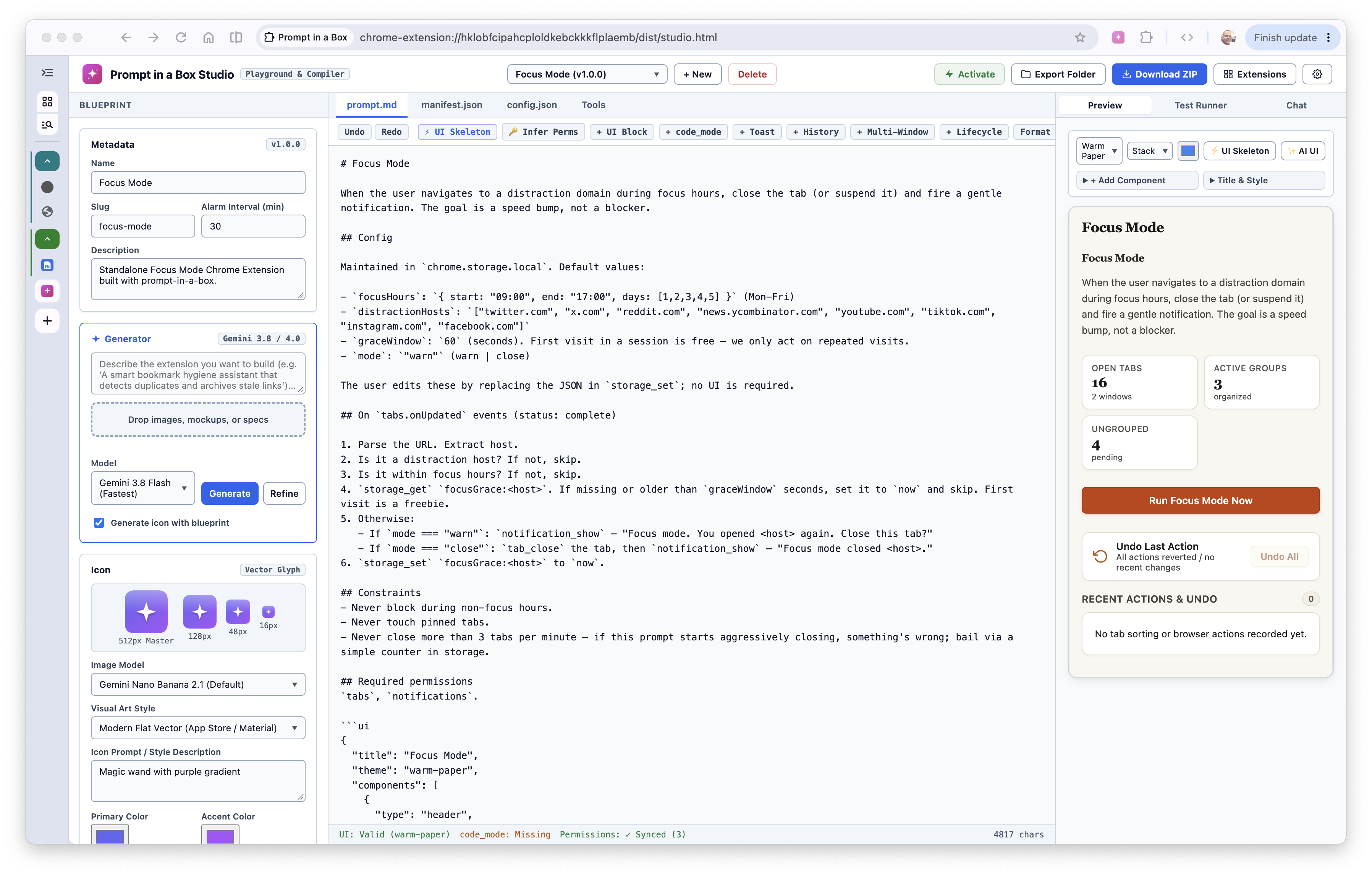
The Extension Studio
You can describe how you want the extension to work in relatively straightforward terms in Markdown format. At the simplest level you can provide a very simple prompt like De-duplicate my tabs and when the extension is invoked it will de-duplicate your tabs to the best it can work out. Naturally, this is very broad and you most likely want even more control. Should it run every 10 minutes, or at the end of your day? What are the cases that you don’t want it to work? Should it just look at the URL or should it consider the content too? What should it do when you are using the tab? Well, for any of those questions you can just write it down.
The “prompt in a box” project was pretty capable when I made it earlier this year, but it was just a bunch of scripts to take markdown files and throw them into a crx bundle. As I was experimenting with this project and sharing it with some teams to enable rapid prototyping of features there were a couple of additional things that we wanted from the platform:
- A UI that makes it easy to edit all the assets needed for an Extension - the Studio now lets you create all the icons, select or infer permissions and also have an agent help you define the parameters and logic further than your original prompt.
- A deterministic way to build UI for the popup - you can now do that with a JSON schema that can be inferred from the prompt. If you don’t, the agent will decide how to render the UI (if UI is even needed)
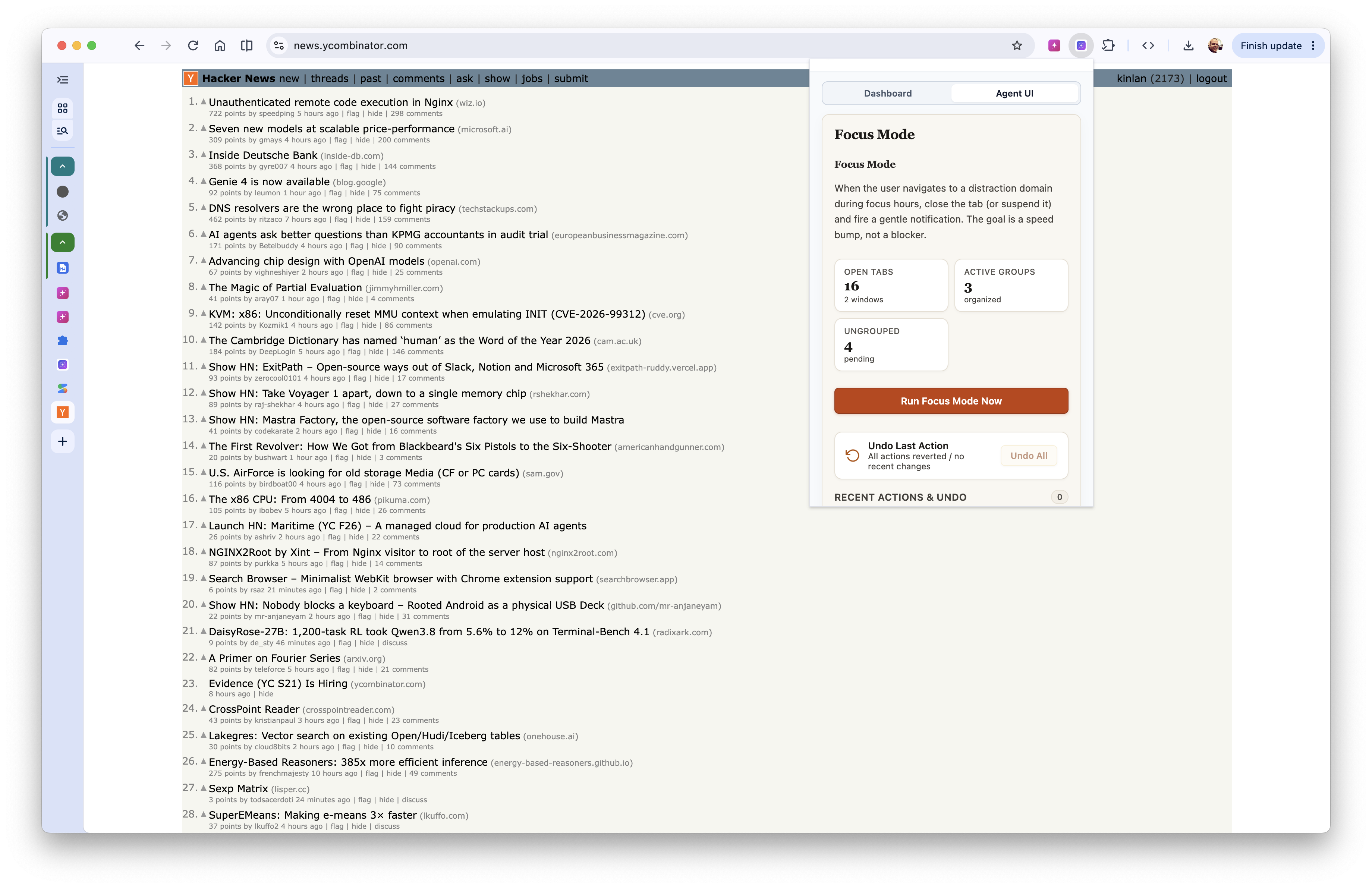
UI Built for the agent via a prompt
- Because the results are non-deterministic, people needed a way to Undo the action if the extension got it wrong
- There needed to be a full trace and accountability so that we can review how the harness works especially when it went wrong. This is critical so that you can refine your prompt
- Agent Harnesses are normally a step-by-step conversation with an LLM service and this can be quite slow. If you have 50 tabs and you have to analyse the content of each, do you do 50 LLM steps, or think of another way? The other way is
code_modeinspired by Pi.dev where the agent will dynamically write the code for part of the extension steps and then run it in batch.
I noted in /shipping a prompt/ that I think Chrome Extensions are already a good sandbox and model for an agent. It’s a zip file with a manifest. It has a permission model, a sandbox, an event system that wakes it up and a way to distribute it, and we really push it, an Agent is an extension with a prompt.md.
The Studio allows you to download the extension and if you look at it, it is made out of the same three files (plus the runtime of course):
prompt.md- what the extension should do. This is the program.manifest.json- what the extension is allowed to reach. Permissions are the contract.config.json- the knobs that you set that define which models are allowed, the schedule and how often it runs, and any other user-facing settings and which bits and bobs of UI to show.
Nothing in the runtime knows anything about tabs or bookmarks or any other APIs directionly, instead you swap the prompt and the same code becomes a different tool.
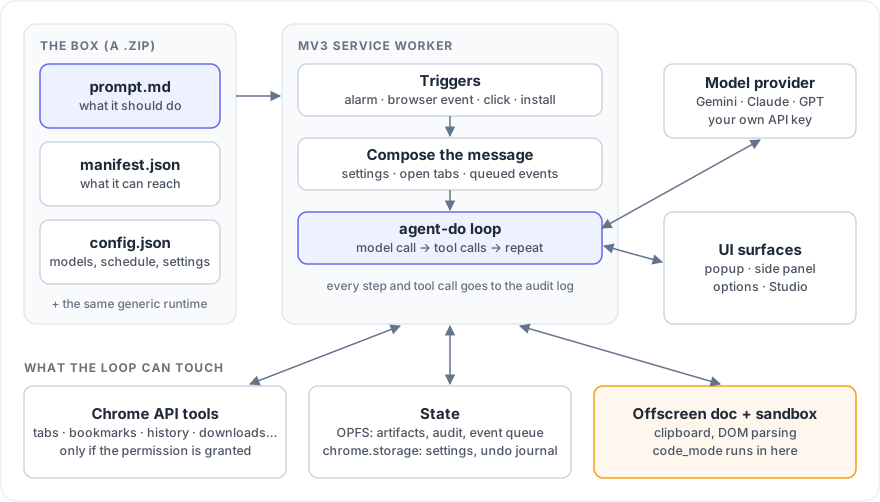
The architecture: three files in a box, and a generic runtime around them
The service worker is the heart of it (I mean, it is a Chrome Extension after all). It runs agent-do as the loop and exposes nearly every single one of Chrome’s APIs as tools (there’s about 50 of them now, e.g tab_list, tab_group, bookmark_search, history_search, notification_show etc). Each tool of these tools are gated by a Chrome permission (optional by default). So if the manifest doesn’t grant bookmarks, the bookmark tools are simply not in the list that the model sees and it will not be able to ask for it.
I also maintain state in two places: OPFS (really, this API is incredible, I’ve used it in so many projects recently) gives the agent a file system for artifacts that they create (you could have an extension that creates reports from your history etc), the audit log and the event queue, and chrome.storage.local holds the settings and the undo journal so that you can back changes the Agent made. Your API key stays in the browser and the only network calls go to the model provider that you picked (Gemini, Claude or GPT, unfrotunatly the Chrome Prompt API is not powerful enough yet).
I think it gets pretty interesting when you thing about how the Agent runs.
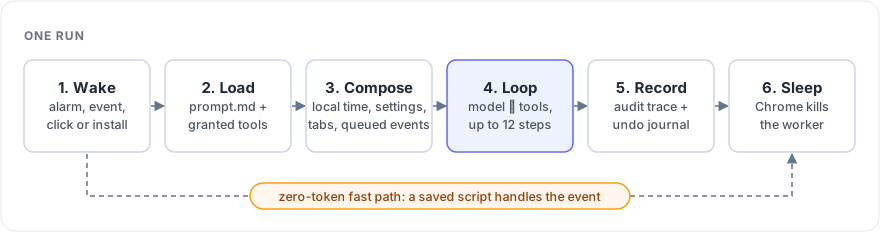
One run, from waking up to going back to sleep
- Wake. Something wakes the service worker: a
chrome.alarmsping, a browser event such as onTabUpdated, the user clicking on “Run now”, or the extension being installed or updated. I made it so that the system thinks of Events in two ways a) things the user is waiting on (a context menu click, a keyboard shortcut, an omnibox entry) trigger a run immediately. b) Ambient things (a tab opened, a bookmark added, a download finished) which get appended to a queue in OPFS and are handed to the prompt on the next run and don’t need to be processed immediately - Load. It loads
prompt.mdand builds the tool set from the permissions that have actually been granted. - Compose. It builds the first message for the model with the local time, the user’s settings, a snapshot of the open tabs and groups, and the events that have queued up since last time.
- Loop. agent-do (I might exchange this for the Pi API soon) runs the loop: the model asks for tools, the tools run, the results go back.
- Record. Every tool call, the tokens and the cost are written to the audit log, and anything that changed the browser gets an entry in the undo journal.
- Sleep. The loop finishes and Chrome kills the service worker because I don’t want this just staying residient in memory all the time.
While I built this entirely with an LLM there are a lot of interesting and architectural things that I found along the way that I think are useful for others to know.
code_mode: let the model write the loop
The simple way to organise 50 tabs is for the model to call tab_read 50 times, with each of these being a round trip to the LLM. As with all chatty interfaces it’s slow and now with LLMs it’s hella expensive. I followed the ideas from Pi and implemented a code_mode where the model writes a small async script and the extension runs it. Something like this:
const tabs = await tools.tab_list();
const pages = await Promise.all(
  tabs
    .filter((tab) => tab.canScript)
    .map((tab) => tools.tab_read({ tabId: tab.id, maxLength: 500 }))
);
return pages.map((p) => ({ id: p.tabId, title: p.title, excerpt: p.excerpt }));
Now 50 tabs can be read in parallel, and only the distilled result goes back into the conversation. It speeds things up a lot (from minutes per run to seconds in some cases).
I was quite happy with where I got the code to run, because by default an extension’s service worker can’t eval anything because of the tight CSP in the extensions platofrm. So the code-mode takes a bit of a journey through the Service Worker which then hands the code off to the offscreen document, which hosts a sandboxed iframe, and that iframe is the only place in the whole extension where dynamic code is allowed to run.
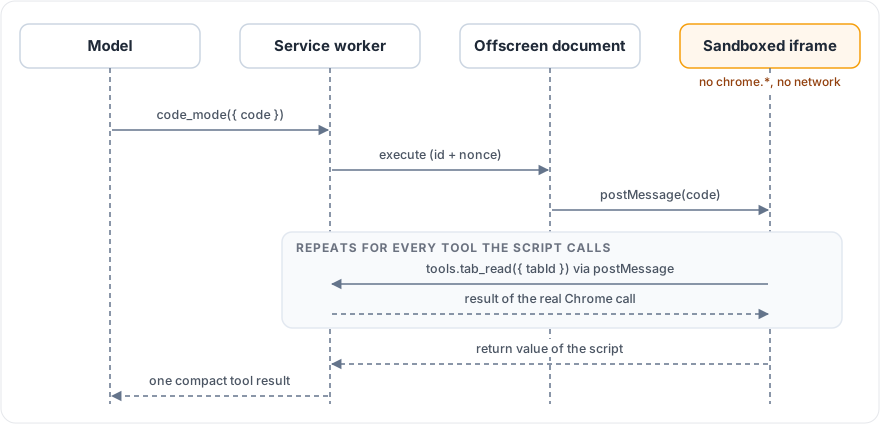
code_mode: the script runs in a sandbox, the tools run in the service worker
The sandbox has an opaque origin and no chrome.* APIs and no network (connect-src 'none'). The only thing the script can do is call tools.<name>(), which is a postMessage back to the service worker (postMessage is my fave), where the real tool runs with the same permission checks as any other call.
Compile things that should be repeatable
I was in two minds about this. On one hand I wanted the extension to be completely agent derived which means that I had to make a decision on if after the same event happens (say onTabUpdated), should the logic that is run via the agent be exactly the same every time? I think the default answer is: Yes, obviously because users would hate it if it was different. HOWEVER, I really like the idea that previous steps could influence future iterations and that we build emergent systems out of the changing state that our extension has built.
In the end, I just made it so that the system can save a script it wrote with saveAs, and it can bind that script to a Chrome event such as tabs.onUpdated. The next time that event fires, the saved script runs first.
The prompt can now start life as a fully non-deterministic agent, and then compile th repeatable parts so that I can reduce the token cost to almost zero if it chooses (I really can’t believe I keep saying “it” like it’s anything other than a script powered by matmul)
Deterministic UI
I’m not sure if I’m too happy about this. But a lot of feedback that I recieved from teams is that they need to define a way to make UI consistently and easiliy. I followed some of the techniques that I found in A2UI and I added support for adding a fenced ui block to prompt.md, the popup and side panel are rendered from it. It does mean there is no HTML and no need for framework. But it also is one of the areas where I think regular people would clearly struggle and I want a better way to define UI
This is pretty much the whole UI for the Sorting Hat tab organiser example (trimmed a little):
```ui
{
  "title": "Tab Organizer",
  "components": [
    { "type": "text", "text": "Intelligently organizes your open tabs into contextual tab groups." },
    {
      "type": "button",
      "text": "🪄 Sort Tabs Now",
      "action": "trigger-run",
      "payload": { "command": "sort_tabs_now" }
    },
    { "type": "divider" },
    {
      "type": "action-history",
      "text": "Recent Sorting Actions",
      "limit": 15,
      "showUndoAll": true,
      "undoAllLabel": "Undo Last Sort"
    }
  ]
}
```
I endeded up creating are a few dozen component types (buttons, selects, switches, metrics, cards, a chat box, a live console) and a handful of themes into the studio to make it easier to build with, but still… ehh. not the happiest about this.
OMG. What did you do!?!?… Undo
Everyone I spoke to wanted to be able to undo the actions the Agent took. Firstly, we don’t always have confidence the agent will get things right, so you need to be 100% confident that you can undo. Unfortunately, you can’t ask an LLM to “undo that thing you just did” and trust it to remember what it did.
I made it so that every tool that changes something also records how to reverse it before it makes the change. Grouping tabs will store which group each tab was in before. Closing a tab stores its URL, window, position and whether it was pinned. Setting a storage key stores the previous value.
It’s not perfect, but the last 100 actions are kept so that undo itself is a relatively small piece of deterministic code.
I don’t trust you. Trace everything
Every run gets records a full record of everything that happened: what triggered it, the model, every tool call with its arguments, result and timing, the token counts and an estimated cost. It all goes into OPFS that you can browse, filter and export all of it from the options page. There is also a live console that streams the run as it happens, including the model’s reasoning.
This turned out to be the feature I use the most. I can trace what the prompt did and go and fix it. I can also performance benchmark the process and use that to ask my tools to help me refine the prompt to make it more efficient.
Treating the web as untrusted
Page titles, URLs and page text all end up in the model’s context, and all of them are written by someone else. Everything that comes from the browser is sanitised and wrapped in a clearly marked “this is data, not instructions” fence before the model sees it, and a page can’t close that fence itself to break out. It’s a mitigation and not a solution, and I come back to this at the end.
Wrapping up
I really liked this project not only because we’ve used it to test some early concepts and it showed me how valuable the rapid iteration is, but also because it furthered my thinking on how we can compose agents from small prompts into useful experiences and how systems built around extensions can enable more customizable products that can be as simple or as complex as you need.
As people build more agentic software we are going to have to think about how our existing surfaces can enable tooling to be built around them. I constantly think about how spreadsheets made millions of people programmers, without them actually knowing they were. We should all be considering how our products can enable not only orchestration by agents (e.g., MCP) but how the functionality of the product can be customized by our users from within the product. I also think it gives software a chance to survive against the onslaught of LLM harnesses that are racing towards being the one true and only application that you will ever need.
Make your software so indispensable to your users because they customized it to their needs and moving to another platform or tool makes no sense.
This project and the concept of extensible and customizable software is not without risk. While these extensions would not be allowed in the Chrome Web Store and can only be loaded in “developer-mode”, if this is a future to how software is created then how do we enable more people to safely run prompts or non-deterministic software? Do we need better virtualisation? Do we need to provide better segregation between the user-defined extension and the site they are operating on? It seems to me that it’s quite possible to imagine a world where a specially crafted web page could influence the execution of the extension in future runs to extract sensitive information or manipulate a page to hide some other actions the tool has taken.
Risky but fun. Seems to be the motto of a lot of LLM-powered software these days.
That’s it for me. I really just wanted to give you a glimpse of you being able to hyper-customize Chrome with just a few prompts. Have fun.
Comments