My voice harness is my new operating system
Published by Paul Kinlan on:
Earlier this year I built an Esper Machine that I was planning to integrate into my IO talk to showcase something cool that we can do on the web.
I think it was really cool and it got me thinking about how we might be able to use voice to do more with my computer, so much so that I built a voice harness. That is, a harness like Claude or the pi-cli, but you can control all of the actions via just your voice. I use it quite a lot and it’s given me a glimpse of how a future operating system might work.
This post isn’t about voice interaction (although it is very cool). It’s about the web runtime I built around it, which lets me control my machine with my voice and builds a new operating layer in the browser through mini-apps. It’s also about what building it showed me the web platform is still missing.
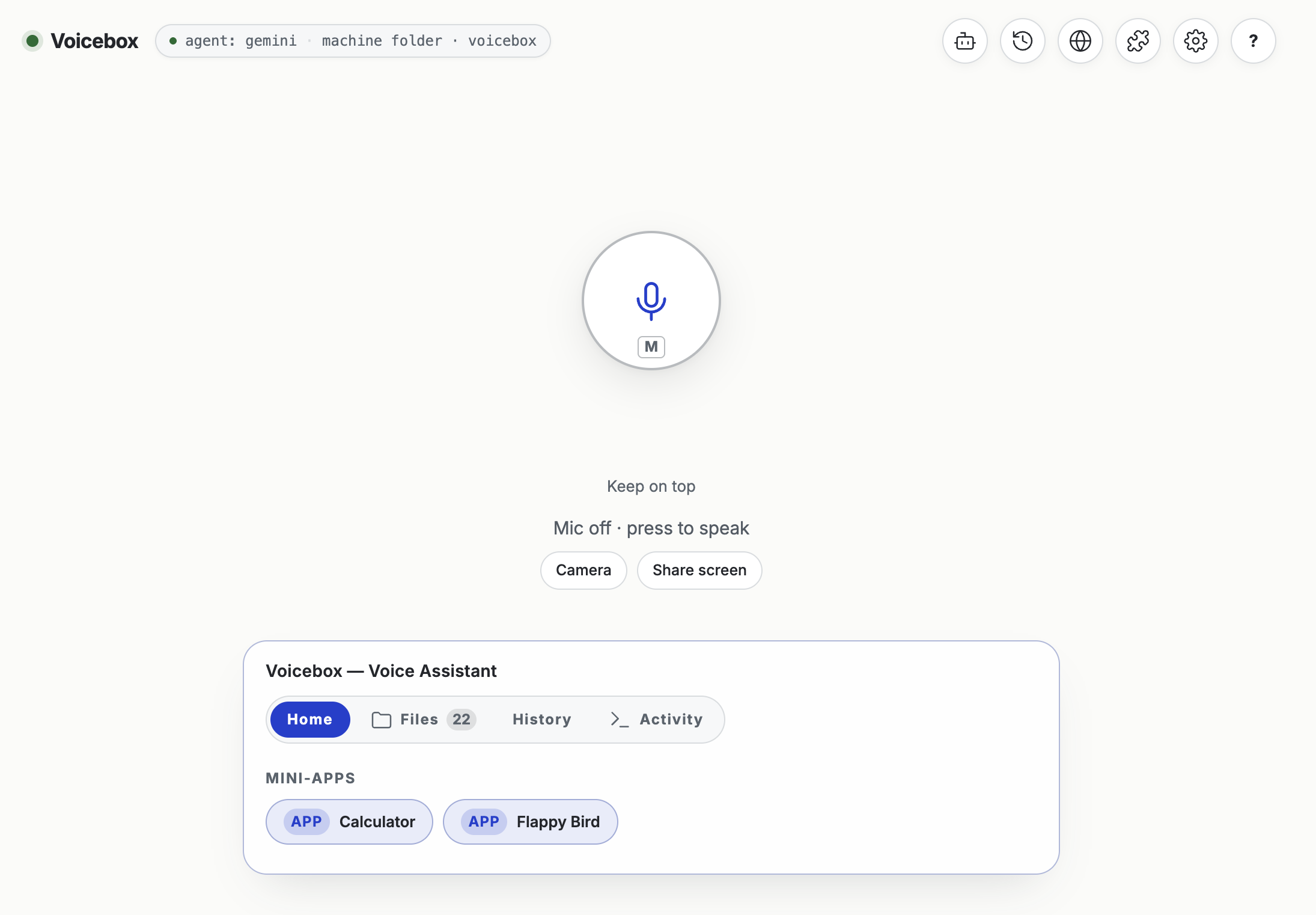
Voice box default UI
The more I use LLMs and I communicate with them using plain language, the more I find that my typing slows down my ability to interact with them. I think far faster than I can type, and that clashes with how I like to work with an LLM: loading up the prompt or chat turn with a lot of context, thoughts and ideas. At the same time, when I’m at my desktop working on something, I often don’t want to switch tasks. I want a tool to pick up on something asynchronously and start working. If something could listen ambiently while I keep working, start on a task, and then have a back and forth with me, that would be amazing. I think I’ve built that.
I’ve also been inspired by environments like OpenClaw that give me access to my machine and workspaces and let me control them through chat. If you’ve been reading this blog for a while, you know that I’ve built many experiments that integrate Claw-like experiences directly into the browser. Now I want to do the same with voice. Gemini-3.8-live was a game-changer for me: the model responds quickly, can be interrupted, and is capable enough to write code and this unlocked things that I didn’t think were possible.
To give you a quick and dirty run-down of how the project is structured, there are three pieces that are important: a page in the browser that is the interface between the user and the harness (the LLM I used called it a “room” - I didn’t hate it, so it stuck), a small local daemon (node server.mjs, with minimal runtime dependencies) where the agent-loop runs and bridges to the operating system and to the 3rd piece, the live model in the cloud. The mic is captured by an AudioWorklet and streamed over a WebSocket to the daemon, which holds the API key and keeps the live session open, and every tool call the model makes comes back to the daemon to run. The daemon manages all the tools and can work out where to run the tool or access the files whether they live in the browser or on my disk.
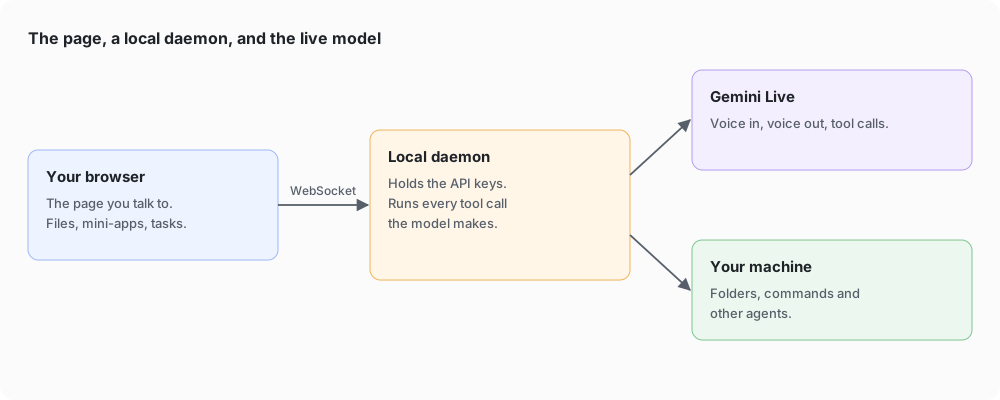
The room, the daemon and the live model. The daemon holds the keys and runs every tool call.
I started with a simple voice loop with Gemini, an OPFS file system and tools to add, delete and edit files. I was happy when I could talk to Gemini and have it create an ISSUES.md and a TODO.md. From those I could create tasks to copy and paste into my LLM to improve the very voice-harness I was talking to. I quickly extended the OPFS to the FileSystem APIs so that I could store them in my repo directly.
Under the hood a project can live in one of three places: the browser’s private storage (OPFS), a folder I’ve picked with the File System Access API, or a folder on disk that the daemon can name by path. The model doesn’t know or care which. When it calls write_file, the daemon asks a small router who can actually reach the active project. If it’s a folder on disk, the daemon writes it. If it’s OPFS or a picked folder, only the page can touch it (a folder handle deliberately has no path), so the daemon sends the write back down a WebSocket and the page does it: it re-checks that the path stays inside the project, writes through its storage adapter, adds an entry to the project’s audit log, and reports what it actually wrote. If neither side can reach the project, the call is refused with a reason instead of failing quietly.
Each project can also carry its own instructions. The page tells the daemon which folder I have open, and the nearest AGENTS.md (walking up to the root) goes into the voice’s system prompt, which is handy in a monorepo.
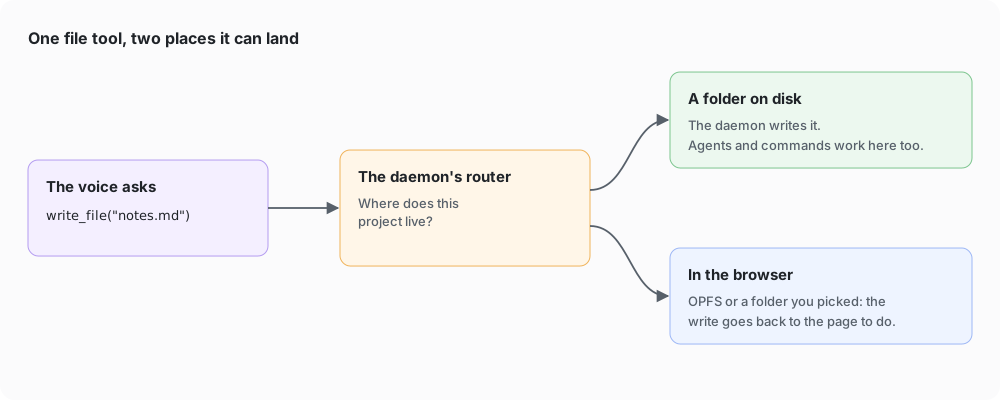
Three places files can live, and one router that knows who can touch them.
As I was editing files with my voice, I wanted to see how capable the Gemini model was. I asked it to create “flappy bird” and it did a pretty good job at creating the HTML and JS for the game. I then realised that I had already created many systems for embedding generated UI into a page, so it wasn’t a huge leap to run the mini-apps I was creating with my voice directly in the harness.
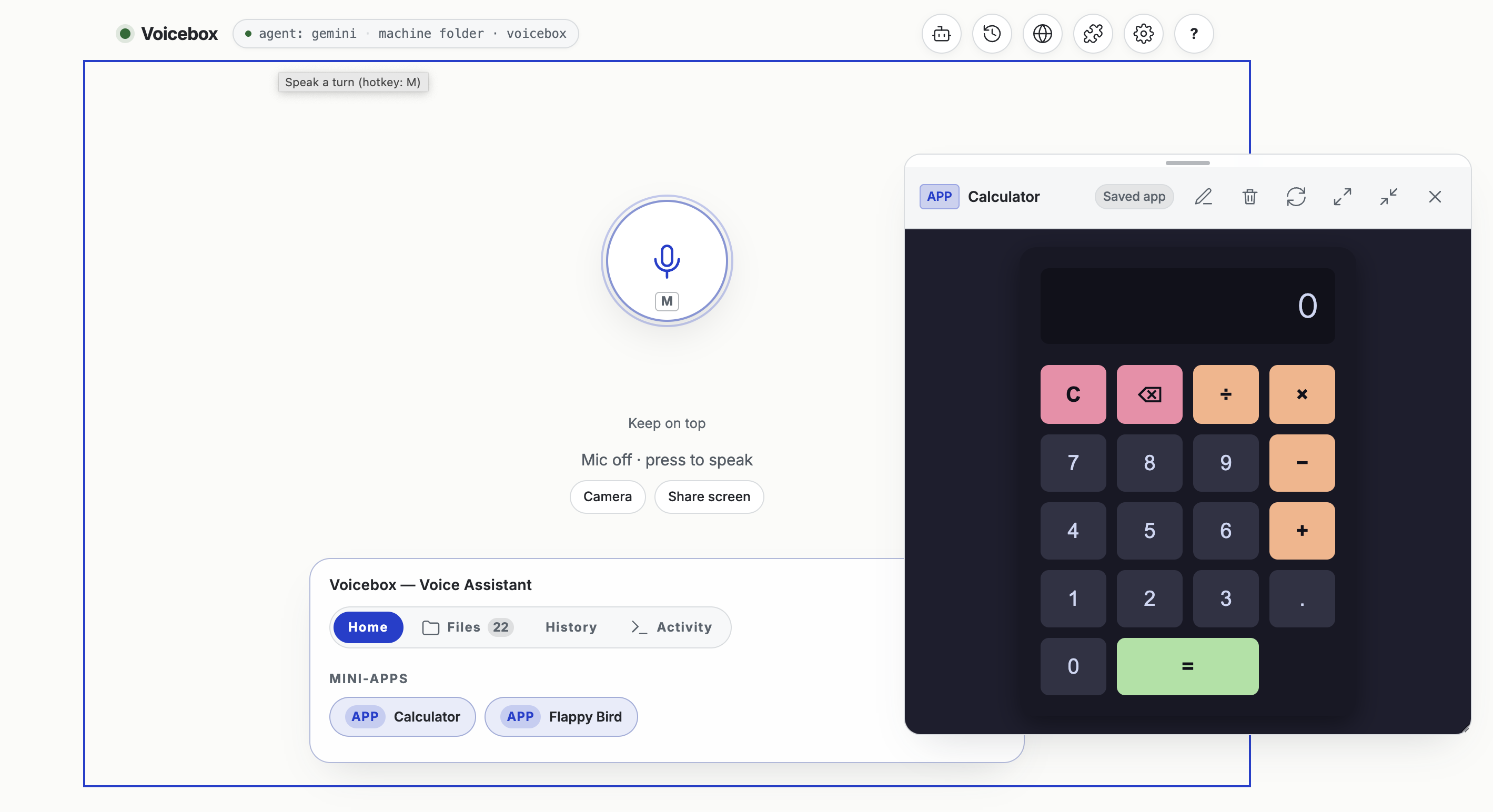
Calculator
A mini-app is just an HTML file. The model writes the whole page and calls launch_mini_app with a title and the HTML. The daemon saves it to a shelf and tells the room to mount it, and next week I can say “open the calculator” and it comes back. Because the code is model-written, it runs two iframes deep. The outer frame is a same-origin bridge that checks every message. The inner frame is sandbox="allow-scripts" with an opaque origin, so it has no cookies, no storage and no way to call the daemon’s API. Its document starts with a content security policy that blocks the network by default.
The tools are WebMCP. An app calls document.modelContext.registerTool() with a name, an input schema and an execute function. The registration travels over a private MessagePort to the bridge and up to the daemon, and the model can call it like any other tool. Apps can also speak first, with voicebox.sendMessage().
The entire mini-apps model is described in the following image. It’s complex, but it’s pretty understandable.
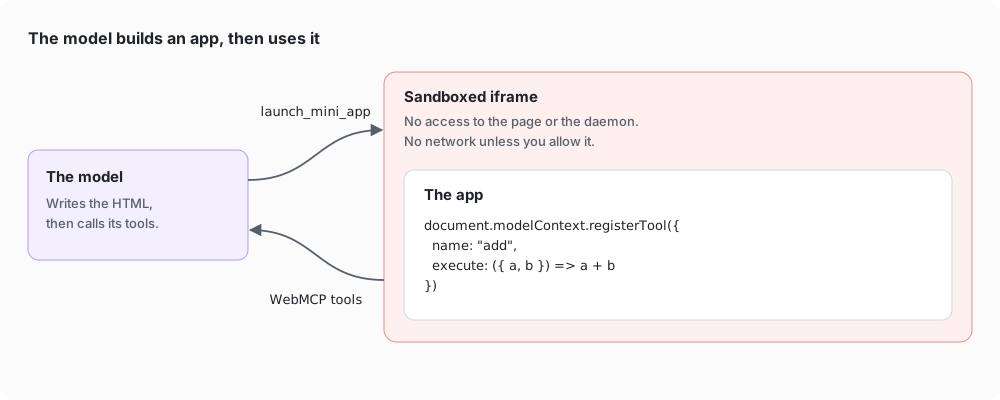
Mini-apps: made by the model, kept as files, run two iframes deep, driven through WebMCP.
The harness has tools that extend its functionality and extensions that let people customize it to their needs. It can manage files, and it can create apps and run them… Wait, I think I’m building an operating system.
Ok, so if I’m building an operating system, I would like it to work alongside me a bit more. I noticed that Gemini-3.8-live can also take in video streams… interesting, well Chrome has a getDisplayMedia API that captures the screen. It turns out it’s not too difficult to hook up web-based screen sharing to the Gemini API and have it help you with what is on the screen.
Co-working with me with what is on the screen.
You will see in the above video that there are still some UI issues with windows opening on top of each other, and there is a bug in the harness where I don’t keep capturing the screen properly to send to the LLM. One thing I did like was that I can use the Picture in Picture API to make it clear that I am still talking to the harness and I can see the actions it wants to perform.
Mistakes aside, this ability to co-work with your computer and have it see what you see and help you is incredible and a major unlock for asynchronous working.
An operating system also needs a way to add capabilities that I didn’t build in myself. I noted in Extensible Web Apps that I was inspired by how the Pi Harness lets you extend the capabilities of your tools without them having to build it in to their product. This project is another experiment in adding Extensions. For example, while many LLMs provide a Search capability, I also wanted the user to be able to configure Search functionality from any other system, like Brave. It can even be extended with custom WASM tools.
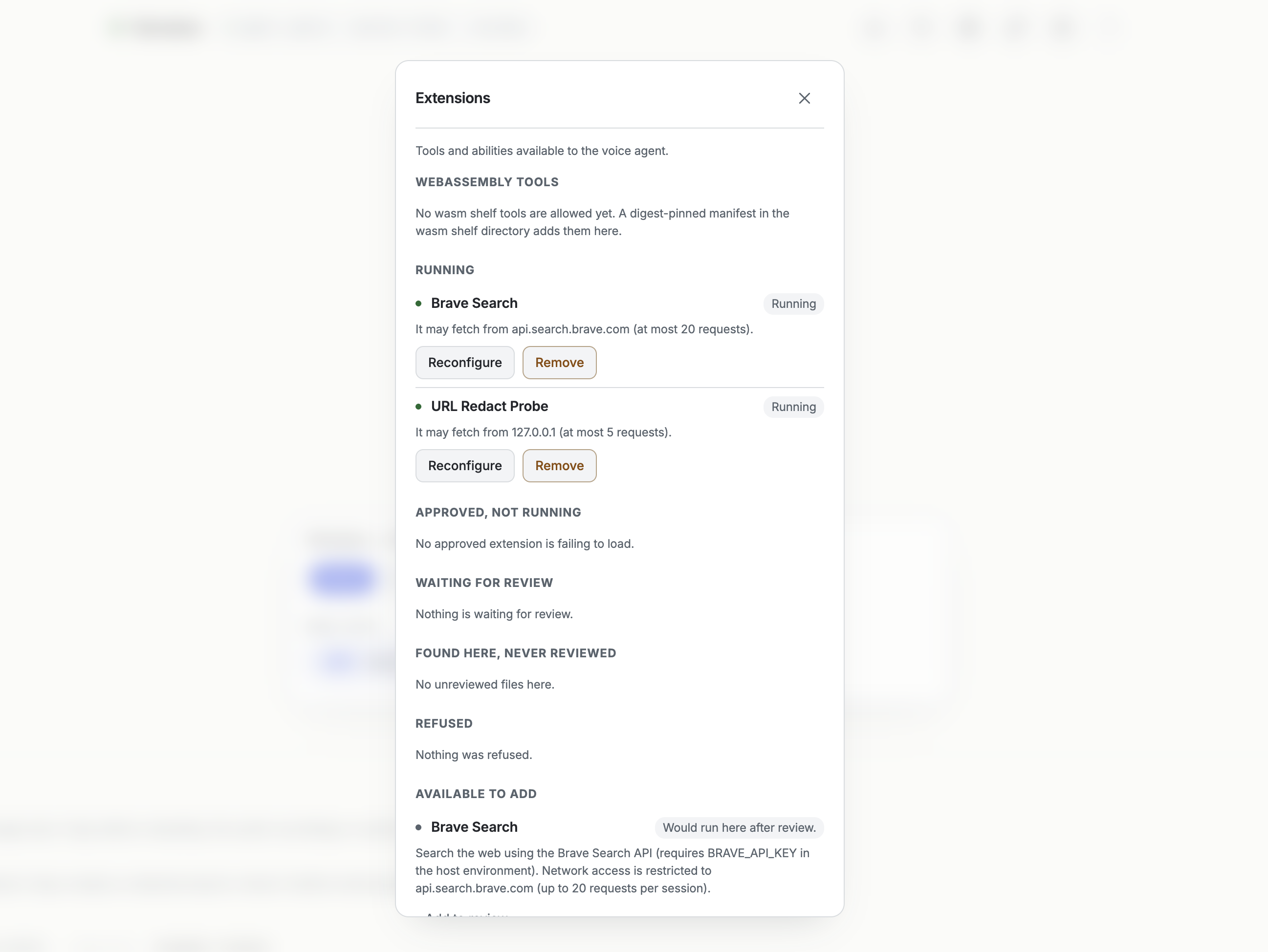
Extensions for your voice harness
This capability is pretty powerful, because it exposes the APIs as standard tools that any LLM can call. It works surprisingly well too. You can tell though, that this UI was LLM generated and it needs to be cleaned up.
Extensions are deliberately not code. An extension is a JSON descriptor that parameterises one of six primitives the daemon already has: http-get, read-file, write-file, list-files, now and wasm. The Brave Search extension, for example, is a few lines of JSON that say “make a GET to api.search.brave.com, at most 20 times a session, with this header”. The header value is $BRAVE_API_KEY, which the daemon fills in from its own environment, so the key never reaches the page or the model. Every extension, whether it comes from the catalogue, is sideloaded, or is proposed by the model itself, passes the same admission check and then needs my approval before it loads. The model can propose a tool, but the only thing a proposal can do is write a file.
WASM tools are the way in for real computation. A module is pinned by its SHA-256 in a manifest, re-hashed on every call, has no imports at all, and runs in a worker thread with memory and time limits. Those tools are handed to the model directly as functions.
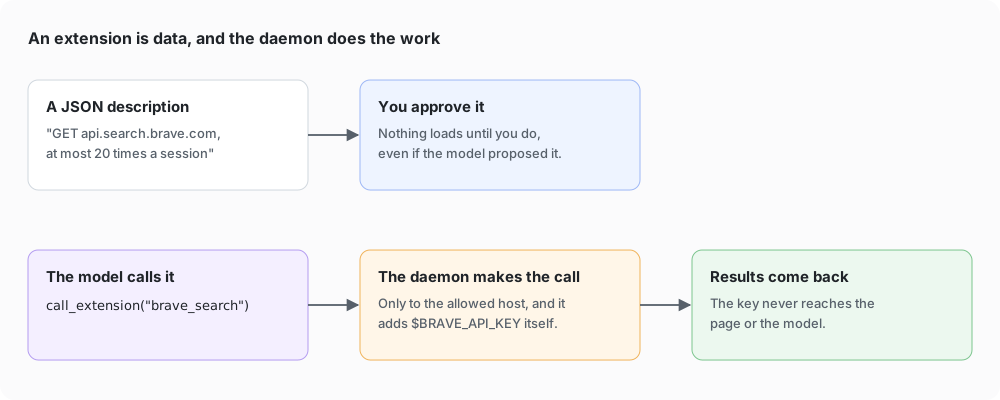
Extensions are data over a fixed set of host primitives. WASM tools are pinned by digest.
Extensions add tools inside the browser, but some tasks need more than that. Gemini-3.8-live has been an amazing model, but I also use other harnesses that have access to more context and functionality, such as my email, my documents and my machine’s settings. So I added a way for the voice harness to hand tasks to them.
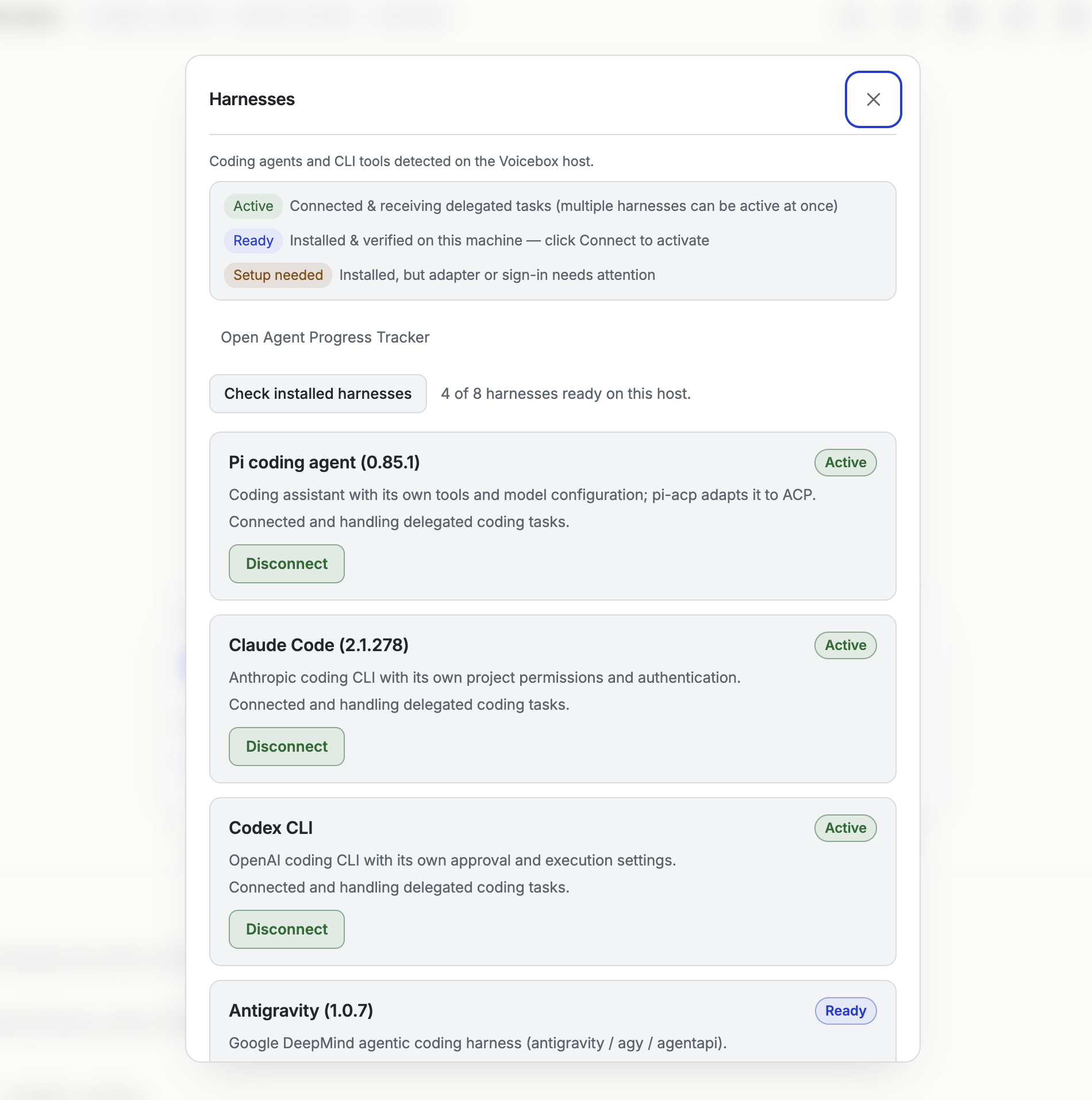
Harni for your Harness
Because the daemon bridges out to the native system, my web-based harness can talk ACP to any of the user’s configured Agent Harnesses: in my case Claude Code, Agy, Pi and Codex. This enables some incredible use cases. I want to change some system settings with my voice? I can do that now. I want to create a detailed report and send an email? My other harnesses have access to my Gmail and Drive, so I can do that too. It also opens up a huge amount of risk because it can, err, do all the stuff that I just said it could do. Anything that reaches the voice loop, including whatever is on a shared screen, ends up in the model’s context, and the model can then make tool calls to harnesses that have access to my email and my machine. A prompt injection on a web page could take the same path. I don’t have any safeguards for this yet. The usual answer is to ask the user to confirm each action, but I haven’t worked out how to do that effectively with my voice, and it’s an area I still need to explore.
Delegation is a single tool, delegate_task(agent, task). The daemon’s task host looks up the agent, hands back a handle straight away so the voice can keep talking, and runs the work in the background, streaming progress to a card in the room. For Pi and Claude Code it speaks ACP over stdio: initialize (checking only the protocol version), session/new with the project folder as the working directory, session/prompt, and then a stream of session/update messages. When the agent asks for permission, Voicebox answers from the agent’s declared tool list and whether every path stays inside the project. Adding another ACP agent is a line of config: a command and its arguments in acp-agents.json.
Two details I like. The project folder is snapshotted before and after a task, so the result says which files the agent created, changed or deleted. And the agent keeps its own sign-in, because Voicebox strips its own model keys from the agent’s environment.
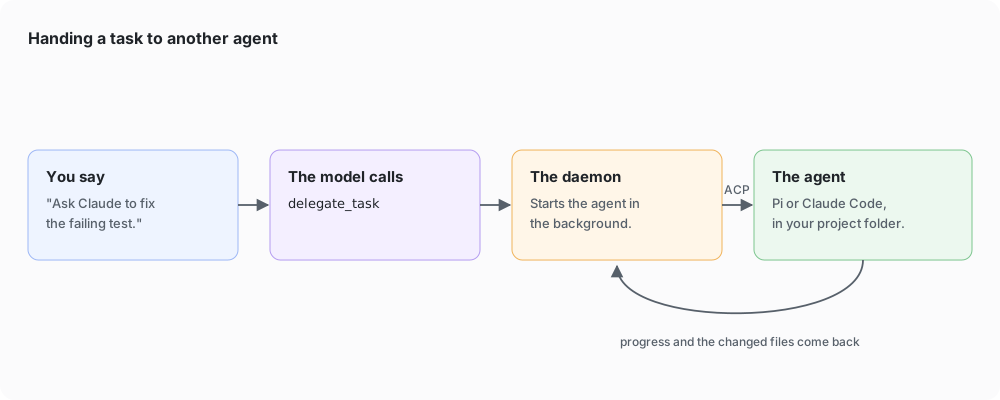
From a sentence to a background task on another harness.
The voice can also run commands itself. run_command runs a shell command in the active project folder (it has to be a real folder on disk), in its own process group, with a 20 second deadline and 64 KB of output. A live session can only change files or run commands if it carries real room authority: a paired bearer, the session cookie from the one-time URL the daemon prints at startup, or the room’s own token, not just a local Origin header. To know what’s there, the model can search an index of the command-line tools on my machine (git, gh, bd, npm and so on), the project’s npm scripts, the extensions, the WASM tools and the agent harnesses. What it isn’t is a sandbox. It runs as me.
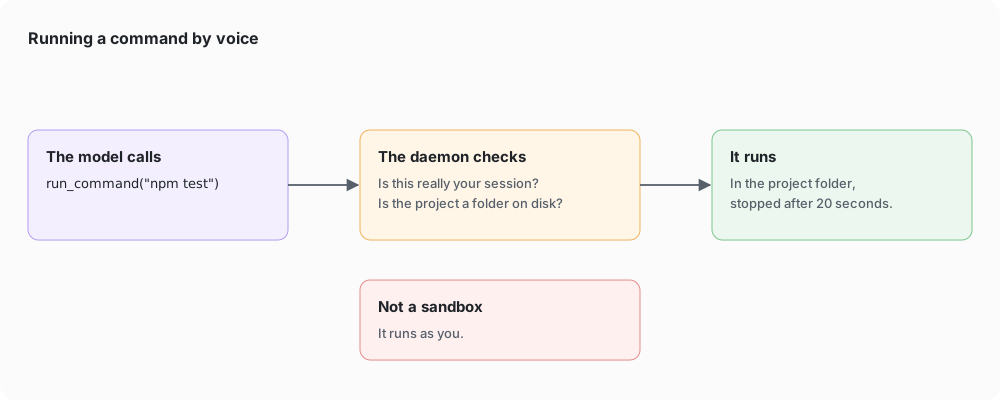
Local commands: bounded and recorded, but not sandboxed.
So why build this on the web at all? This was the simplest way I felt I could build a voice harness (I am a web developer after all). It’s not clear to me that this needs to be at the web-layer, but… I think it offers 1) an interesting opportunity for application control if I was to provide a simple Pi-like voice harness to apps. 2) software on demand: the harness can build the apps I need, save them for future runs, and because each mini-app exposes its tools through WebMCP, the harness can script across all of them.
Having built it on the web, I found that a couple of things already work well:
- Storage: Chrome at least has a pretty well structured way of thinking about accessing files on the user’s system. OPFS gives you a filesystem constrained to your origin and the File System Access API and FileSystemObserver let the browser monitor, read and write files directly on the user’s system (assuming they have granted access).
- WebMCP: I can build mini-apps (more on WebMCP) and expose those tools to the LLM and it just works. It’s kind of incredible.
- Media processing: The continued investment in media over the years, with AudioWorklets, mic access and the getDisplayMedia API, gives me A LOT of capability to interact with the system exactly how I wanted to.
There are also gaps. A lot of the daemon exists because the browser can’t do these things yet, so here’s what I think we need from the web platform:
- A bridge to the system: We have no way to talk to the operating systems or apps that the user might grant without creating a proxy or daemon that this application talks to. There hasn’t been enough discussion of “escape hatches” and how we might securely let the browser access systems and services on users’ machines. This leads people (like me) to build their own bridges to the platform, which could be a recipe for disaster.
- A bridge to harnesses: We have ACP but ACP works primarily through a STDIO stream and this requires a local-service. We need a way to allow in-page agents to delegate to the user’s preferred harness. This isn’t specific to this voice-harness; it would be good for all types of LLM. Today, the expectation is that a user is in an LLM and controls a page. I want a world where I’m on a page in the browser and the page can delegate to my LLM.
- Local speech models: Any LLM harness tends to interact with a user’s private and personal data. While I see opportunities for local LLMs running on the device, and more of them able to run in the browser, I’m not seeing real-time voice models yet. The more we use systems, the more I think people will want to run as much locally as possible 1) for privacy and 2) for cost.
I had a lot of fun building this project as it let me push the boundaries of what I think people are doing on the web and it was also very interesting to explore the concept of functionality built by the LLM being usable by the LLM in future interactions. I can see a world where we build composable units of programs that can be summoned by my voice, which leads me to the fact that I think we will see Agent Harnesses move more and more into Operating System territory.
The code is on GitHub. If you’re working on any of these problems, I would be very happy to work on this with you, so let me know. Oh, and this project can be pretty expensive to run.
Comments